Jett Hitt
Senior Member
This makes my head hurt.VEPro itself is VST3, but it cannot host VST3 plug-ins.

This makes my head hurt.VEPro itself is VST3, but it cannot host VST3 plug-ins.


Do you have issues with the plugin on an M1?when the update comes for m1 mac, how do I update? Just download again?
No, I'm switching from a PC to a mac soon so this is just me trying to be prepared hahaDo you have issues with the plugin on an M1?
I want to make a list of the people who have issues on Silicon chips and if possible of user who have it running fine on an M1.
On the download page I will always mention a version number and its release date.
The update from this week was better tested than the first release, and I had enough reasons to believe that all reported M1 / Silicon issues were fixed as well.
If I find and fix something that explains Mac M1 issues, I will do mailing to notify all user.
Given

Don't do it!No, I'm switching from a PC to a mac soon so this is just me trying to be prepared haha


Hi Peter,Do you have issues with the plugin on an M1?
I want to make a list of users who have issues on Silicon chips and if possible of users who have it running fine on an M1.
On the download page I will always mention a version number and its release date. If I find and fix something that explains Mac M1 issues, I will do mailing to notify all user.
The update from this week was better tested than the first release, and I had enough reasons to believe that all reported M1 / Silicon issues were fixed as well.
Given
hello,Hi all,
Samplicity (now a new company with an older owner) has been silently working on plugins in the last 1,5 year and is proud to announce it first product:
Berlin Studio
a reverb plugin with the acoustics of a large, famous German studio.
18 orchestral positions on the recording stage, captured with a Decca Tree, an AB-Pair and surround microphones.
Check out the new Samplicity website and the first demos.
Cheers,
Peter
No, I'm switching from a PC to a mac soon so this is just me trying to be prepared haha
I am baffled, you are using an Intel Mac. Not a recent Silicon one...Hi Peter,
I can confirm too, that the Logic validation is fine now and the EQ works. But the CPU usages is still pretty heavy, better though, but heavy. 50 instances seems absurd to me in the moment. Even 5 is too much (I‘m on BigSur with a 2015 iMac).
Maybe I don’t understand completely yet how Berlin Studio works too. In the beginning of this thread you mentioned, that the usage for positioning only, doesn‘t need much ram. But where’s the difference when I load a preset, lets say for 1st violins or front stage mics ? The CPU usage seems the same to me.
I can reduce CPU, when I set tails for mics I don=t need to 0 right ? Any other tricks to reduce CPU hunger ?
No sorry, not before the iLok integration end of this month.hello,
is there a trial version?
Thanks
Thanks. Will the price change after ilok ?No sorry, not before the iLok integration end of this month.
No, the current price was planned for the remainder of the year, not related to the iLok version planned for this month. The intro price will be extended until end of February.Thanks. Will the price change after ilok ?

Thanks for mentioning this, top!awesome update @Peter Emanuel Roos . I'm not having anymore EQ spikes and noises with this version. Thanks for the update.
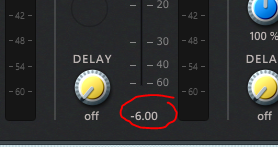
That is correct, it was not designed to be available and it was not "styled" as such. I now remember you mentioned it.By the way Peter, did you disable the function to key in the value we want for this field? coz that's a very useful feature. Pardon me in case i've missed out anything on the update log.
Thanks Peter, sent you a mail to your support addressI am baffled, you are using an Intel Mac. Not a recent Silicon one...
The software code for that is the exact same source code as for Windows. Ok, maybe 99.5% the same.
For Silicon there are more differences, also for computations. Not for Intel.
Can you share (maybe via email or PM?) what processor your Mac has (i5, i7?), how many cores and which speed?
On my Intel i5 dev laptop, 16 instances brings me to 50% CPU, with acceptable buffers sizes.
The next version has no processing when there is no input signal. This makes it easier to spot "CPU spikes" and to share their details. The 1.0.6 still has a constantly "running" engine.
Curious about your iMac's specs.
PS: I am playing a bit with Logic on my Intel Macbook Pro:
it makes a big difference if you set Processor Buffer Range to Large. At Small, the CPU usage is really high. And this is not your audio interface block size (!). I have that 128 samples, with a short roundtrip of 12 msec.