×
What's new

Samplicity announces Berlin Studio plugin

Why will you not be able to use an iLok dongle or iLok cloud? Do you have a reason for machine-based?

I will receive the Pace / iLok development software next week and start integrating it. This will take at least two weeks of development, I have been told.
iLok Cloud is a pain in the ass to deal with when you switch between machines often. Machine activations removes the extra steps of logging into iLok to move your cloud session.
 
Hi Folks, I received an email with the link for the Berlin Studio 1.0.2 update on Windows (earlier this morning UK time).
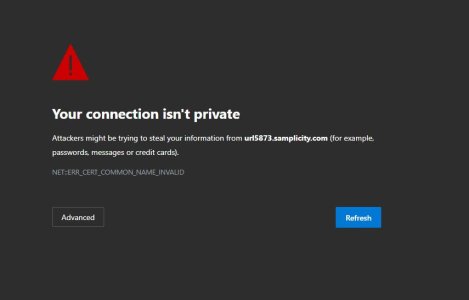
I've tries both Edge and Chrome browsers and I'm getting this error. So, I can't get access to the update.

Cheers...

Anyone else having this problem?
Capture.JPG
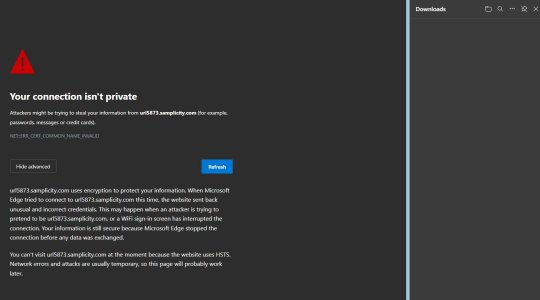
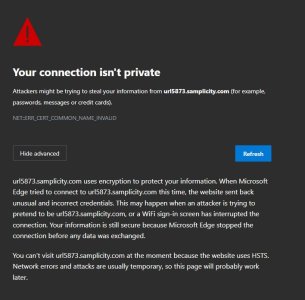
I got the same, but clicking on advanced gave me a more detailed error message on Edge:

"This server couldn't prove that it's url5873.samplicity.com; its security certificate is from *.sendgrid.net. This may be caused by a misconfiguration or an attacker intercepting your connection."

So it looks like a mismatch between the certificates between the two domains.

When I clicked on "Continue to url5873.samplicity.com (unsafe)" in Edge, at first it seemed to do nothing, but after a while I noticed a progress bar on the icon for Edge on the taskbar. When the progress bar completed the install file for version 1.0.2 was in my download directory. The install worked fine. The version number on the plugin GUI shows it as version 1.0.5.
 
I got the same, but clicking on advanced gave me a more detailed error message on Edge:

"This server couldn't prove that it's url5873.samplicity.com; its security certificate is from *.sendgrid.net. This may be caused by a misconfiguration or an attacker intercepting your connection."

So it looks like a mismatch between the certificates between the two domains.

When I clicked on "Continue to url5873.samplicity.com (unsafe)" in Edge, at first it seemed to do nothing, but after a while I noticed a progress bar on the icon for Edge on the taskbar. When the progress bar completed the install file for version 1.0.2 was in my download directory. The install worked fine. The version number on the plugin GUI shows it as version 1.0.5.

This is indeed from SendGrid, my email list provider. My first email "shot" via them.

I now understand that they wrap links somehow for measurements. A big company, strange that this can happen.

Please send me an email if you have issues / questions like this.
 
Been testing the reverb throughout the morning. Ended up replacing all my current spacialization solutions. It sounds incredible and it's very versatile. I love the interface as well. Super convenient.

In case it helps somehow: In Reaper it is running like a charm. On Ve Pro not so much. On my end it seems to be the interface that is quite cpu heavy and slows ve pro to a crawl but only while I keep the interface open. I don't have a dedicated video card so that might be related.

My specs are i7 8700, 64 gb ram and windows 10.

Again, amazing work. Definitely ground breaking.

VEP interface in general gets slow on my end when instances are connected. So my initial thoughts are that it's something related to how VEP handles graphics.

Other plugins don't cause this issue, though. I tested the vst2 version (needed for vep) on Reaper as well and it worked without issues. CPU consumption is very low, even with the interface opened.

As for iLok cloud. In my case cloud requires a constant internet connection. It's a pain but Vepro already requires that in my case.

Not sure why developers are moving away from machine activation on Ilok. But VSL told me they didn't support it.
 
I am anything but a tech guru (that's why I'm a Mac user), but I thought that it would be simple enough to revert to the initial version of the plugin (1.0.1?). That does not seem to be the case, however. Even after running the original installer, the plugin remains at 1.0.2. The option to remove the plugin is grayed out. I don't think I have ever seen this before.

So to clarify where things stand, the plugin crashes the validation in Native Silicon mode, but it will run with the CPU spiking between 75-100% and clipping when a note is played. In Rosetta mode, it simply says Not Authorized with no option to do so.
 
I am anything but a tech guru (that's why I'm a Mac user), but I thought that it would be simple enough to revert to the initial version of the plugin (1.0.1?). That does not seem to be the case, however. Even after running the original installer, the plugin remains at 1.0.2. The option to remove the plugin is grayed out. I don't think I have ever seen this before.

So to clarify where things stand, the plugin crashes the validation in Native Silicon mode, but it will run with the CPU spiking between 75-100% and clipping when a note is played. In Rosetta mode, it simply says Not Authorized with no option to do so.
I actually could go back to 1.0.1 easily. I deleted the plug ins in their folders by hand, ran the old installer and Berlin Studio runs again in VE-Pro on my old Mac slave. Still not perfect on CPU, but hey, better than nothing :2thumbs:
 
I got the same, but clicking on advanced gave me a more detailed error message on Edge:

"This server couldn't prove that it's url5873.samplicity.com; its security certificate is from *.sendgrid.net. This may be caused by a misconfiguration or an attacker intercepting your connection."

So it looks like a mismatch between the certificates between the two domains.

When I clicked on "Continue to url5873.samplicity.com (unsafe)" in Edge, at first it seemed to do nothing, but after a while I noticed a progress bar on the icon for Edge on the taskbar. When the progress bar completed the install file for version 1.0.2 was in my download directory. The install worked fine. The version number on the plugin GUI shows it as version 1.0.5.
Thanks for the reply, rudi.

My error seems to be slightly different.
When I click on 'advance' I don't seem to have the option "Continue to url5873.samplicity.com (unsafe)"

Samplicity announces Berlin Studio plugin
 
@devonmyles curiouser and curiouser.

I don't know why we're both getting different options.
My version of Edge is as follows:

Microsoft Edge Version 107.0.1418.52 (Official build) (64-bit)

I am on Windows 10, latest version too.
 
For anyone on Logic/M1, I just experienced the very-loud-sound bug with the new Berlin Studio 1.0.2 when adjusting the EQ on the surround mic. Logic showed 236.2dB above full-scale! Currently looking for all the pieces for my monitor drivers 😂

In the meantime, I'd recommend holding off using the plugin just yet while Peter has a chance to look into it. Which is a hard wait... in my testing so far it sounds fantastic!
 
@devonmyles curiouser and curiouser.

I don't know why we're both getting different options.
My version of Edge is as follows:

Microsoft Edge Version 107.0.1418.52 (Official build) (64-bit)

I am on Windows 10, latest version too.

I am on Windows 10, latest version as well
But my Microsoft Edge Version is 107.0.1418.35 (Official build) (64-bit).
I've just seen that there is an Edge update available. I will update later and take it from there.

EDIT: Updated Edge to Version 107.0.1418.52 (Official build) (64-bit) and it's the same error message and I can't retrieve the Berlin Studio 1.0.2 update.
Oh well, thanks for your help, rudi.

Samplicity announces Berlin Studio plugin
 
Last edited:
It´s not only M1 I‘m afraid. I guess Peter has a hard time. Everybody loves Berlin Studio, but a lot of (mostly Mac) users got (different) problems
 
For anyone on Logic/M1, I just experienced the very-loud-sound bug with the new Berlin Studio 1.0.2 when adjusting the EQ on the surround mic. Logic showed 236.2dB above full-scale! Currently looking for all the pieces for my monitor drivers 😂

In the meantime, I'd recommend holding off using the plugin just yet while Peter has a chance to look into it. Which is a hard wait... in my testing so far it sounds fantastic!
Peter is aware of the EQ feedback issue. I sent him a bug report about it some time back and he promised to look into it. So it's on his radar.

In my experience, there's no risk of it happening unless you activate the EQ and increase the gain, so my recommendation would be to hold off using the EQ, rather than the entire plugin, for now.
 
I am on Windows 10, latest version as well
But my Microsoft Edge Version is 107.0.1418.35 (Official build) (64-bit).
I've just seen that there is an Edge update available. I will update later and take it from there.

EDIT: Updated Edge to Version 107.0.1418.52 (Official build) (64-bit) and it's the same error message and I can't retrieve the Berlin Studio 1.0.2 update.
Oh well, thanks for your help, rudi.

Samplicity announces Berlin Studio plugin
Just send me an email, @devonmyles - like I said earlier.

I don't have V.I. Control nicknames in my records (!) - If I can send you the links by email, you can download without any problem.

This is caused by a big company that will lose me as a customer.
Will try to switch to MailChimp or whatever.
 
Just send me an email, @devonmyles - like I said earlier.

I don't have V.I. Control nicknames in my records (!) - If I can send you the links by email, you can download without any problem.

This is caused by a big company that will lose me as a customer.
Will try to switch to MailChimp or whatever.

Sorry, I missed that for some reason.
Okay, thank you I will forward my email.
 
Peter is aware of the EQ feedback issue. I sent him a bug report about it some time back and he promised to look into it. So it's on his radar.

In my experience, there's no risk of it happening unless you activate the EQ and increase the gain, so my recommendation would be to hold off using the EQ, rather than the entire plugin, for now.
I’m posting the warning because the bug was supposed to be fixed in 1.0.2, the new update released today. I’ve already emailed Peter etc. but just a heads up for folks
 
I’m posting the warning because the bug was supposed to be fixed in 1.0.2, the new update released today.
We might be talking about different bugs then. The one I reported was not addressed in the release notes for 1.0.2, so I’d assume it’s still there.
 
For anyone on Logic/M1, I just experienced the very-loud-sound bug with the new Berlin Studio 1.0.2 when adjusting the EQ on the surround mic. Logic showed 236.2dB above full-scale! Currently looking for all the pieces for my monitor drivers 😂

In the meantime, I'd recommend holding off using the plugin just yet while Peter has a chance to look into it. Which is a hard wait... in my testing so far it sounds fantastic!
Did the loud noise happen while using 256 buffer size, right? Or 512? Peter will definitely look into it and fix it. I’m constantly helping him out alleviate this but it takes time. You guys must be careful with this bug as you don’t want to break your speakers or worse, your ears.
 
I have created a new test setup and with that, I can confirm that I am replicating reported issues with Silicon, Logic and AU validation at the moment. Not yet tried, but this may also include other setup combinations.

For now I recommend not to update. Contact me via email (or PM here) if you no longer have the installer of the first release and want to revert.
 
Back
Top Bottom