Heinigoldstein
Senior Member
10.13.6 of course, sorry. The machine is old (mid 2010) but not that oldAre you sure you typed 10.3.6?
From 2004?
https://apple.fandom.com/wiki/Mac_OS_X_10.3.6
If so, this must be caused by the code not being supporting that OS and processor (?)
Settings were used for MacOS 10.14 and Intel processors that support the AVX instructions (available for some 10 years).
If you have a more recent MacOS version, I can make a special build for your configuration, to test if this might resolve the CPU load issue. I will take this offline with you via email (expect it later this weekend from my deltaworks.nl domain). I am curious and hope to learn from this.
The AVX flag was set in this 1.0.2 update - not in the first 1.0.1 release. Maybe a hint for me.
Be aware that validation in Logic is a process that can easily send false negatives, by caching etc. The next installer will include a cleaner tool for first removing previous plugin files. Does Logic show that you now have the 1.0.2 version? This is now also (barely) visible in the lower left corner of the plugin window.
The processing inside this plugin is rather light compared to other convolution-based plugins. It should not slow down regular computers.
Regards,
Peter
 I saw the hint that it´s not tested, but it worked with 1.0.1 and passed validation.
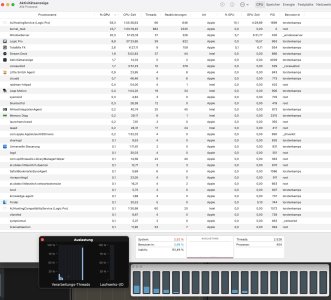
Yes, the plug in shows 1.0.2 in Logic and I´ve seen other users reporting, that it´s pretty light on CPU. Maybe it´s related to BigSur ? Unfortunately I can´t update the OS on my slave, but if it solves the problem I would move to Monterey on my Logic host machine.
Would you prefer, if I send a mail to your support address instead of posting this here ?