×
What's new

Samplicity announces Berlin Studio plugin

Son of a Gun 😲. It really freaking works 🥳. Are you some kind of FL Studio wizard? Thank you very much :thumbsup:


I've read it somewhere that iLok will be the next step (next update in december?) and this method now is just a temporary solution -> Will be tied to iLok in the future.
Not a wizard...I just had experience with some plugins with the same issue (ie: Fresh Air). Haha
 
The latest update also have this...probably I need to tune the buffer size to test out.
Yeah, happens to me too with the new update. On 512 buffer size, or higher, everything works smooth. What I don't get is how does it happen in different Daws? Also, I have a friend that said this is happening in Logic on a Mac.

Weird...
 
I am not having much luck with the latest update. The VST3 plugin crashes S1v6 on Mac (M1 Pro), and the VST3 and VST2 fail validation in Cubase 12. Samplicity announces Berlin Studio plugin
 
No worries man, genuinely blown away.

Only thing I can think that I would love is a LP/HP filter on the front panel for each mic. And a 'apply eq to all' option so I can quickly apply the same EQ shapes to the different mics quickly if I just need to kill a resonant frequency, to save me doing the action 3 times.

Pulling the bass out of some mics can really clean things up, would just be cool to have an easy way to tidy. But in all seriousness, this is a fantastic plugin. This is how convolutions should always be packaged going forward. Easy UI - Powerful results!

-DJ
Sweet!

EQ filters in the main window: that feature was killed two weeks before the release and replaced with the popup :-D Because of the visual clutter it gave, and I thought it was not main functionality.

But I totally get your point, fast, most important features up front and tweaking a step away.

EQ apply to all option: excellent tip!
 
Very generous, but the VST2 Version already fixed the issue... Don't see any more CPU usage with the VST2, so yeah, i'm happy 😁
Top!

The plugin "versions" are of course functionally the same and cannot give differences in CPU usages.
 
@Peter Emanuel Roos the plugin seems to be working on my M1 Mac Studio in native mode (no noise). However, it still fails to validate.

Update: The validation for the plugin crashes. It runs, but CPU usage is high. In Rosetta mode, it says Not Authorized, and inserting it crashes Logic.
Logic is well known for caching information about plugins even when they are physically gone or replaced.

I will write a FAQ with steps on how to handle this. Send me an email if you want to get this info as soon as it is available.
 
@constaneum can you try using the Generic Low Latency Asio Driver and not your daily audio interface driver and see if there is any improvement? Do you still get the EQ loud feedback problem?
I spent a few days on this, also with great help from Allen, but decided that the Logic issues had a higher priority to be delivered (they were understood, confirmed and removed).

This one was reported by a few users and I have not yet been able to reproduce it. But it will be fixed!
Send me an email if you are affected by this. I will not do a full round sending out of updates for this one (unless it turns out to affect more users).
 
Hi, Peter.

Talking to Allen, I did some TEST.

I have the same problem with Nuendo at 256 buffer size ( at 512 it works well )

I tried with the Apollo X6 driver and the RME HDSP RAY DAT driver.

Same problem.

Same test run with Studio One 6, no problem.

At 256 buffer size everything works fine.

So it seems a Steinberg problem.
 
I am not having much luck with the latest update. The VST3 plugin crashes S1v6 on Mac (M1 Pro), and the VST3 and VST2 fail validation in Cubase 12. Samplicity announces Berlin Studio plugin
Hi, Peter.

Talking to Allen, I did some TEST.

I have the same problem with Nuendo at 256 buffer size ( at 512 it works well )

I tried with the Apollo X6 driver and the RME HDSP RAY DAT driver.

Same problem.

Same test run with Studio One 6, no problem.

At 256 buffer size everything works fine.

So it seems Steinberg Releated.
It is a weird issue to investigate... I spent a few days on this, delaying the sending out of the Silicon / Logic fixes. This will be fixed of course - the Steinberg remark is an interesting clue
 
Last edited:
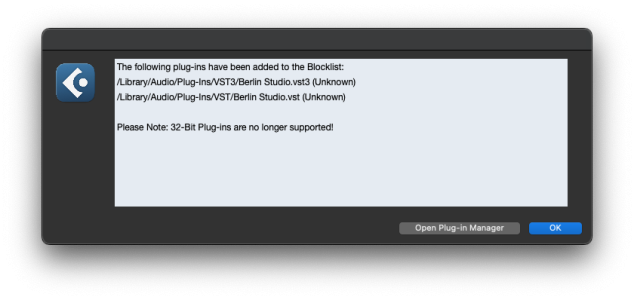
I am not having much luck with the latest update. The VST3 plugin crashes S1v6 on Mac (M1 Pro), and the VST3 and VST2 fail validation in Cubase 12. Screenshot 2022-11-19 at 07.57.34.png
This is puzzling. First mention of the Cubase validator blocking it.

I use the same validator as Cubase in my tests and use Cubase as well and will do more tests on my M1 Mac.

The plugin files are signed and contain the name Samplicity in different layers, so "Unknown" is really weird.

And what about that confusing 32 bit remark? All Samplicity software is 65 bit of course.

Wait... 65? :dancedance:
 
Hi Peter,.

unfortunately I´m afraid to say, that the update is even worse than the 1st version on my side (BigSur, late 2015 iMac). Still fails the Logic validation, still extremely high CPU load after manual activation, but now the validation fails for VE-Pro on my old Mac Pro slave too. Version 1.0.0 worked, although you stated it´s not tested for OS 10.3.6.
VE-Pro validation on the BigSur Mac passed, but the CPU load is high too with only 1 Instance. And it starts crackling when you activate one of the EQs.
 
Hi Peter,.

unfortunately I´m afraid to say, that the update is even worse than the 1st version on my side (BigSur, late 2015 iMac). Still fails the Logic validation, still extremely high CPU load after manual activation, but now the validation fails for VE-Pro on my old Mac Pro slave too. Version 1.0.0 worked, although you stated it´s not tested for OS 10.3.6.
VE-Pro validation on the BigSur Mac passed, but the CPU load is high too with only 1 Instance. And it starts crackling when you activate one of the EQs.
I’m having the same issue on max osx Big Sur with the latest update unfortunately.
 
This is puzzling. First mention of the Cubase validator blocking it.

I use the same validator as Cubase in my tests and use Cubase as well and will do more tests on my M1 Mac.

The plugin files are signed and contain the name Samplicity in different layers, so "Unknown" is really weird.

And what about that confusing 32 bit remark? All Samplicity software is 65 bit of course.

Wait... 65? :dancedance:
In case this is helpful, coming back with an update re. the error on Cubase, at least for me:

* Cubase 12.0.50 Rosetta 2 - VST3 and VST2 plugins are blocked
* Cubase 12.0.50 Native AS - VST3 plugin validation passes and works well (at least at 256 bytes buffer)

In Studio One:

* 6.0.1 - Rosetta2 VST3 version crashes S1
* 6.0.1 - Rosetta2 AU version works fine (256 bytes)
* 6.0.1 - Native AU version works fine (256 bytes)

(I need Rosetta2 till VSL goes native)
 
Hi Peter,.

unfortunately I´m afraid to say, that the update is even worse than the 1st version on my side (BigSur, late 2015 iMac). Still fails the Logic validation, still extremely high CPU load after manual activation, but now the validation fails for VE-Pro on my old Mac Pro slave too. Version 1.0.0 worked, although you stated it´s not tested for OS 10.3.6.
VE-Pro validation on the BigSur Mac passed, but the CPU load is high too with only 1 Instance. And it starts crackling when you activate one of the EQs.
Are you sure you typed 10.3.6?

From 2004?

https://apple.fandom.com/wiki/Mac_OS_X_10.3.6
If so, this must be caused by the code not being supporting that OS and processor (?)
Settings were used for MacOS 10.14 and Intel processors that support the AVX instructions (available for some 10 years).

If you have a more recent MacOS version, I can make a special build for your configuration, to test if this might resolve the CPU load issue. I will take this offline with you via email (expect it later this weekend from my deltaworks.nl domain). I am curious and hope to learn from this.

The AVX flag was set in this 1.0.2 update - not in the first 1.0.1 release. Maybe a hint for me.

Be aware that validation in Logic is a process that can easily send false negatives, by caching etc. The next installer will include a cleaner tool for first removing previous plugin files. Does Logic show that you now have the 1.0.2 version? This is now also (barely) visible in the lower left corner of the plugin window.

The processing inside this plugin is rather light compared to other convolution-based plugins. It should not slow down regular computers.

Regards,
Peter
 
In case this is helpful, coming back with an update re. the error on Cubase, at least for me:

* Cubase 12.0.50 Rosetta 2 - VST3 and VST2 plugins are blocked
* Cubase 12.0.50 Native AS - VST3 plugin validation passes and works well (at least at 256 bytes buffer)

In Studio One:

* 6.0.1 - Rosetta2 VST3 version crashes S1
* 6.0.1 - Rosetta2 AU version works fine (256 bytes)
* 6.0.1 - Native AU version works fine (256 bytes)

(I need Rosetta2 till VSL goes native)
Thanks so much for our tests!

This is intriguing and puzzling...

Like many plugin developers, I make use of the JUCE framework, which adds the AU, VST, VST3 wrappers around a single code base, and JUCE is very well tested... I do not have a single line in my own code for a specific format.

The MacOS binaries contain an Intel layer and a Silicon layer, they should not be run via Rosetta at all - can you tell me how you are using that? I am not an Apple expert, maybe I miss something.

Is one of the hosts enforcing Intel code to be run via Rosetta on M1 and not using Silicon itself? If so, would separate Intel and Silicon versions of the plugin help, or am I still too confused at this moment?

(Regarding hosts and Silicon, I will not make jokes about Pro Tools here:elephant: - and my work to support AAX is about to start soon :shocked:)

Cheers,

Peter
 
Back
Top Bottom