OP
OP

Yes, iLok 2/3 dongle and cloud, not machine identificationWill there be an ilok cloud option?

Yes, iLok 2/3 dongle and cloud, not machine identificationWill there be an ilok cloud option?

Looking forward to that! Hopefully there will be a nice upgrade path.Of course a surround version is in the planning, with proper panner controls and routing, but this will not be available before spring.


I hope we get at least 2 license per 1 purchase? i like to have a 2 keys.Yes, iLok 2/3 dongle and cloud, not machine identification

 . Especially since you apparently can remove the tail reverb -> Instant positioning and depth?
You just turn the "Dry Signal" down to 0 or mute it, and leave any of the wet signals on.Hi @Peter Emanuel Roos
Dumb question. I don’t notice a wet/dry knob in the screen shots? Or have I simply missed this? I trust this plugin is not only for use as an insert?
Thanks
Yes, you can use the Woodwind location (or even the percussion positions) or alternatively the front or mid surround positions and choose the one you like best. Then adjust the dry signal delay to bring the ensemble forward to taste as needed.But what i don't really get is, how you would add an ensemble patch into this concept? Sections (divisi) seems straight forward -> Each Section = 1 Position. But let's say, you did that, but you want to layer the strings with a library that only has an ensemble patch. What would be the approach for that? Put it on the Woodwinds section and adjust the delay?
As far as I know you have to select a position. Depending on the position you select the nature of the reverb tail will change. I've tried the front surround, mid-surround, woodwinds, percussions and choir position and each one has its own character, including width, since they are real locations. Some of the results are quite pleasant!Can I use Berlin Studio as a tail reverb on the master bus without selecting any position?
i.e. as a “normal” tail reverb on master bus
I didn’t consider that the tail would be different pr. position, good point!As far as I know you have to select a position. Depending on the position you select the nature of the reverb tail will change. I've tried the front surround, mid-surround, woodwinds, percussions and choir position and each one has its own character, including width, since they are real locations. Some of the results are quite pleasant!


I would like to know this as well!@Peter Emanuel Roos how should we be preparing the input signal going into the reverb?
For example, let’s say we have three trumpets intended to be trumpets a3 through Berlin Studio.
Should trumpet 1 be mostly left, trumpet 2 centered and trumpet 3 mostly right before it gets fed into the trumpets section of Berlin Studio?
Thanks! Bought it yesterday. The one instance per track and mute the others is what I've figured outIf you use two instances, you can set it up.
Quantum Leap also uses that approach and claim Surround support
Hehe, no I will not say Berlin Studio supports multi-channel this way.
But (!): if you set the tail level of any reverb channel to zero, after 2 seconds there will be no more CPU use for that channel. So if you do this with the surround mics channel, you can it in a second instance (without Decca and AB) with hardly any additional CPU load.
I am aware that "Surround mics" is confusing in this context. Maybe I should call them Very Wide And High...
Of course a surround version is in the planning, with proper panner controls and routing, but this will not be available before spring.
. Mixing my next film in 5.1 so I'll test this out. I've recorded flutes, guitars, clarinets and percussion this week so I'll def post some examples when I'm finished with it. Also in comparison to MIR.Hope machine based activation can be included sometime in the future. No go for me personally till then.Yes, iLok 2/3 dongle and cloud, not machine identification


 . I mean, than you would have the exact angle of the panning for each position... But i get it, there would have to be 2 options, because some libraries are allready panned...

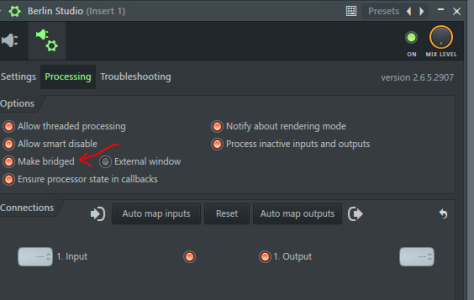
Agreed, just ran into this issue as wellCorrection: There is a bug with FL Studio
The stage location will not be saved with FL Studio. The faders are fine, but the stage location will be the default "violin 1" when you save and open a project with FL Studio.
@developer team: is this fixable? Asking shyly as it kind of messes up my whole plan...