Pier
kiffaudio.com
So why are you looking for a new machine?My old 2017 workstation has hardly broken a sweat runnng our studio master template

So why are you looking for a new machine?My old 2017 workstation has hardly broken a sweat runnng our studio master template


So whilst its a great machine, it is a Windows machine which is plagued by the usual Windows updates, driver compatibility issues etc etc. When Windows is behaving its great, but when it isn't... then I have to fall back on my mobile rig, which can be for weeks sometimes.So why are you looking for a new machine?


Due to the inability to add RAM to Apple Silicon ("AS") Macs, I'd say allocate your $$$ towards RAM and skimp on storage if money is an issue. External storage is easily added, is a lot less costly than Apple's onboard SSDs, and can get you very close to the same level of performance, surely to the point access speed is not an issue in audio production.With a recent update, the university has now installed all sorts of intrusive software on the 2020 i9 iMac I primarily use for music and video production so I’m now looking to buy a new machine sooner rather than later. The iMac has 128GB and I’d say I’m routinely using between 70 and 100 GBs for my sessions. I know the Silicon machines use virtual memory much more efficiently, but I am curious about how much RAM is likely needed to have similar performance, 64GB, 96GB or 128GB, and also what size internal drive to look at. I know I need at least 1TB. I’m also looking for a desktop machine, so likely one of the studios with whatever chip set.
Pros and cons of various configurations? I have been following these discussions but not carefully until now because I thought I still had some years to go with the i9, which would in fact be a perfectly serviceable machine it it wasn’t for the required university software. So pointing me to some particularly good threads (there are a lot) would also be much appreciated.
TB 3/4 has a bandwidth of 40Gbps but in practice it can only reach about 23Gbps of data transfer. This is because 8Gbps is reserved for video and then there's some overhead of the TB protocol.External storage is easily added, is a lot less costly than Apple's onboard SSDs, and can get you very close to the same level of performance, surely to the point access speed is not an issue in audio production.
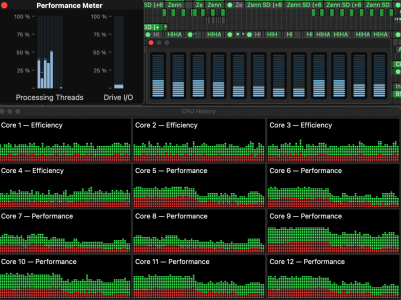
I’d be curious if Cubase is taking full advantage of the efficiency cores (like Reaper). Would you mind checking and reporting if core usage on a demanding project as the guy in the video I posted did (around 9:25 mark)?Cubase is running great on my M2. Just sayin
Yeah, but...TB 3/4 has a bandwidth of 40Gbps but in practice it can only reach about 23Gbps of data transfer. This is because 8Gbps is reserved for video and then there's some overhead of the TB protocol.
More info here.
In my M2 MBP I get about 5.7 Gigabytes per second of read speed which is about 45Gbps (gigabits per second). So it's about double the max data transfer speed on TB.
Remember what we're doing with Audio, too, especially VI Sample data... lots of little bitty random reads, and I haven't seen people talking about 4k Read speeds for the internal Apple SSDs.Don't get me wrong. 23Gbps is fast and is plenty for loading samples and audio tracks.

If the thread starter, or anyone else, wants to go through this and compare M1U vs M2M in real world music production situations, that would be very useful for future potential buyers.
Also it might reveal how big of an advantage a higher core count (at higher price) is or if in practice actually a machine with several less cores but a slightly better single-core performance beats the machine with more cores.
Would be interesting to see tested on a big project what limit is reached sooner, either running out of cores on the M2M or overloading a single core on the M1M.
Such test might even help potential M2U buyers to assess if they really need the extra cores or if the Max already offers enough cores at its speed.
Logic also does not optimally utilize all cores in multi core situations, at least compared to Reaper, as this video shows:
Yeah it's definitely using all the cores available. Did this quick test with Repro.I’d be curious if Cubase is taking full advantage of the efficiency cores (like Reaper). Would you mind checking and reporting if core usage on a demanding project as the guy in the video I posted did (around 9:25 mark)?
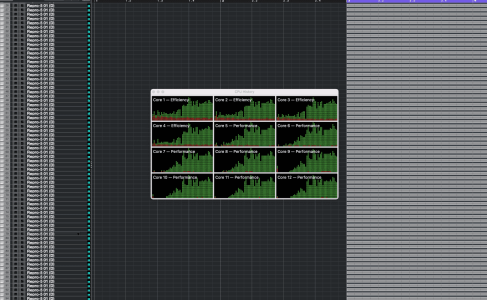
Totally understandable. Whatever test you can run is valuable. We generally need more music/audio-focused testing and comparing of the higher end Apple Silicon Macs as most of what can be found online is about video/graphics and stuff utilizing GPU. The music/audio tests are mostly just about rendering times or track count of identical tracks. You could not know beforehand if the M1 cores are fast enough to allow you to do something specific like fast staccato ostinatos at 32ms buffer size, because no comparable tests are available. You even don't know yet if the M2 cores allow that. And we don't know things like how big a project can be until the M2M runs out of cores and how much bigger it can be with the M1U or M2U. I think all of these types of tests we need to source from a forum like this where many audio-power-users are active and can push these systems in ways that matter to us.I would love to test both ultras side by side. The problem is I have to return the M1U in the next 9 days and have to wait about five weeks for the M2U BTO (could save 600€ buying from a dealer instead of the Apple Store).
Therefore I have to wait five weeks. Because of that I would go straight to the M2U/128/2TB instead of testing smaller units like the M2M.
I could use a test project for the M1U and later run the same project on the M2U for test purposes.
Looks good, thanks for checking!Yeah it's definitely using all the cores available. Did this quick test with Repro.
Really useful, thanks. Well, thats the M2Ultra Studio option out of the window and I'll wait and see what the M3Ultra MacPro brings as internal speeds definately win the day. With my current PC workstation and 18TB internal NVMe drives I'm getting around 3.5 to 4GB/sec read bandwidth average (not bad for an old beast). So if I were to upgrade it would have to be to a MacPro or maybe (just maybe) the newer SuperMicro dual-CPU motherboard with PCIE Gen5, though the CPUs are still insanely $$$$expensiveTB 3/4 has a bandwidth of 40Gbps but in practice it can only reach about 23Gbps of data transfer. This is because 8Gbps is reserved for video and then there's some overhead of the TB protocol.
More info here.
In my M2 MBP I get about 5.7 Gigabytes per second of read speed which is about 45Gbps (gigabits per second). So it's about double the max data transfer speed on TB.
Don't get me wrong. 23Gbps is fast and is plenty for loading samples and audio tracks. But it's not even close to internal speeds.

Yeah. I felt a little bamboozled recently when I learned that real data transfer speeds of TB4 are actually close to half the advertised 40Gbps.Well, thats the M2Ultra Studio option out of the window and I'll wait and see what the M3Ultra MacPro brings as internal speeds definately win the day.

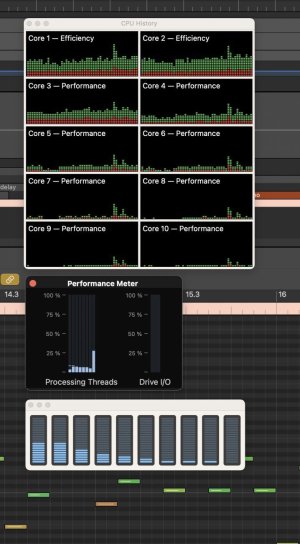
Logic seems to use the efficiency cores more than the others. This isn't a big project with billions of tracks going, but you get the idea:Yeah it's definitely using all the cores available. Did this quick test with Repro.
Curious as to your workflow. Is SSD speed is more important than CPU horsepower?Really useful, thanks. Well, thats the M2Ultra Studio option out of the window and I'll wait and see what the M3Ultra MacPro brings as internal speeds definately win the day.
Hmm interesting. Not sure why it was different for James Zhan in his test.Logic seems to use the efficiency cores more than the others.

You're probably thinking about this section:Logic also does not optimally utilize all cores in multi core situations, at least compared to Reaper, as this video shows:
Yeah that’s what I was referring to.You're probably thinking about this section:
That might well be possible. Still, given that both the Mac and Logic are made by Apple, it is a bit puzzling that they wouldn’t get this right from the beginning while developers of 3rd party apps do.Maybe this is fixed in 10.7.8?

Great, that’s the tests we actually need to see. Just people using their new machines for composing music.Logic is using all cores here. I don't run artificial benchmarks, but I just opened the current session I was working on earlier, nothing gigantic, about 90 or so tracks, and the load seems to be pretty evenly spread out between the cores.