You are using an out of date browser. It may not display this or other websites correctly.
You should upgrade or use an alternative browser.
You should upgrade or use an alternative browser.
M1 Ultra vs M2 Max
- Thread starter Yamaoka86
- Start date
- Watchers 33

OP
OP

He’s back with another great test but mainly for photographers. But still the M1U had great results against the M2U as he said.
The M1U/128 is here and already installed. New project starts today directly on the Mac Studio. Will give some impression the next days how the system performs. Curious after six years intel iMac Pro.

Vik
Vi-k
This guy is more detail oriented than many of the other youtubers, which is great. But as you say – it's mainly for photo work, where 128 gb may not make so much sense(?). However, working with orchestral libraries, it's very useful to have access to more than 64 gb. The main thing to learn from that video may be to avoid Macs with only 32gb (and Macs with only the base storage configuration).He’s back with another great test but mainly for photographers. But still the M1U had great results against the M2U as he said.
Last edited:
OP
OP
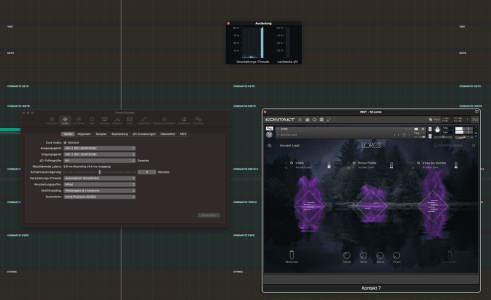
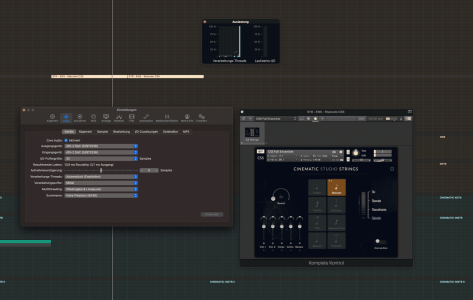
I’ll start the first tests today on the M1U and are a bit confused. While playing fast Staccato ostinatos with CSS and a buffer size of 32 the M1U starts to overload and make crackling noises.
Another test with NI lores and a buffer size of 64 by playing just one note the M1U overloads again on one core.
Can someone with the M1ultra or M1Max can confirm this behavior? I’m a bit shocked to be honest. An almost empty project playing just one note.
Another test with NI lores and a buffer size of 64 by playing just one note the M1U overloads again on one core.
Can someone with the M1ultra or M1Max can confirm this behavior? I’m a bit shocked to be honest. An almost empty project playing just one note.
Attachments
Vik
Vi-k
Are you using exclusively Apple Silicon native plugins? Is Logic in Rosetta or AS mode? Any drivers in the background which aren't AS native?
Getting the kind of latency you show in these images doesn't match the buffer setting at all. Using the 32 buffer here gives me 2.2 ms roundtrip.
Also, try to reduce your Kontakt preload buffer to 18k.
Getting the kind of latency you show in these images doesn't match the buffer setting at all. Using the 32 buffer here gives me 2.2 ms roundtrip.
Also, try to reduce your Kontakt preload buffer to 18k.

Pier
kiffaudio.com
When benchmarking my M2 MBP with U-He synths the load is distributed to all cores. The whole CPU almost reaches 100% of usage before audio cannot be reproduced smoothly.One thing I noticed, first a single core overloads before my multi cores are in trouble. Therefore I would estimate single core power is still more important in my personal user case.
What audio interface are you using?While playing fast Staccato ostinatos with CSS and a buffer size of 32 the M1U starts to overload and make crackling noises.
Your roundtrip latency seems pretty high for a buffer of 32 samples.
Thanks for sharing your experience. Looks like these patches at a buffer size of 64 overload a single core. This is why I was skeptical if the M1 Ultra with its slower cores is really a better machine for music production than the M2 Max with less, but faster cores.I’ll start the first tests today on the M1U and are a bit confused. While playing fast Staccato ostinatos with CSS and a buffer size of 32 the M1U starts to overload and make crackling noises.
Another test with NI lores and a buffer size of 64 by playing just one note the M1U overloads again on one core.
Can someone with the M1ultra or M1Max can confirm this behavior? I’m a bit shocked to be honest. An almost empty project playing just one note.
Here is another interesting video on this topic (not Apple, not Silicon, but probably the same concepts apply):Isn’t single core performance more important for audio work (running long plugin chains in real time on low latency)? Does having 20 slower M1 cores vs 12 faster M2 cores really justify paying the much higher price of the M1 Ultra?
That said, I don't get why such crazy low buffer sizes like 64 are neccessary, when most sample libraries themselves have much higher sample offsets and playing them forces the brain to adjust to some latency anyway. Personally I run at 512, so I guess for my use any of these machines would be good enough.
Pier
kiffaudio.com
They aren't.I don't get why such crazy low buffer sizes like 64 are neccessary
If you play an electric guitar with the amp at say 5 meters from you that's already aprox 15ms of latency from the speed of sound. Nobody can notice that latency.
There's a lot of placebo involved with sound and people do not properly do blind AB tests when deciding which latency they should use.
ComposerWannabe
Member
if you play an instrument 64 is an absolute high you should be playing at.
it's just weird trying to play a piece I piano higher than that.
it's just weird trying to play a piece I piano higher than that.
OP
OP
When benchmarking my M2 MBP with U-He synths the load is distributed to all cores. The whole CPU almost reaches 100% of usage before audio cannot be reproduced smoothly.
What audio interface are you using?
Your roundtrip latency seems pretty high for a buffer of 32 samples.
The Audio interface is the RME Adi2 DAC. I’m about to install my Uhe stuff and make more tests in the evening.When benchmarking my M2 MBP with U-He synths the load is distributed to all cores. The whole CPU almost reaches 100% of usage before audio cannot be reproduced smoothly.
What audio interface are you using?
Your roundtrip latency seems pretty high for a buffer of 32 samples.
Btw I use the buffer size 32 just for test purposes. Normally im using 128 for when Vi instruments. Often I had to change the buffer up top 256 on the iMac Pro.
I just thought that the M1 chip could handle single instruments properly at a buffer size of 32.
Ok for piano I can see how that makes sense, especially when playing more complex pieces.if you play an instrument 64 is an absolute high you should be playing at.
it's just weird trying to play a piece I piano higher than that.
Still, I notice the latency of 512 samples buffer only when throwing and releasing my finger very quickly on a key and focusing on the fact that the sound came after I released my finger. But at for playing in instruments, at my basic skill level and with the parts I write, I don't need to go lower. Maybe 256 would feel a tad snappier on subconscious level. But that's just me, I won't argue that others might find it unplayable. But with non-percussive instruments like strings, brass or woodwinds I don't really get it.
OP
OP
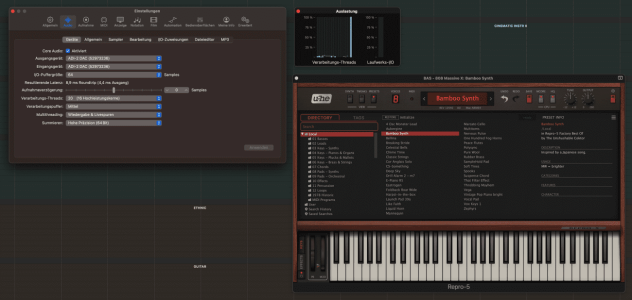
Uhe Repro5 CPU usageWhen benchmarking my M2 MBP with U-He synths the load is distributed to all cores. The whole CPU almost reaches 100% of usage before audio cannot be reproduced smoothly.
What audio interface are you using?
Your roundtrip latency seems pretty high for a buffer of 32 samples.
Btw I changed from automatic to multi core thread in the logic audio settings (don’t know if it does anything good or bad)
Wow.. the repro5 HQ mode sounds so good.
Attachments
Last edited:

thesteelydane
Bunker Samples
Make sure the instrument track isn't selected when playing back. That usually solves single core overloads in Logic for me - but I'm on 2020 Intel mini. Apart from that there's clearly something wrong here, that machine shouldn't overload on a single instance of anything.The Audio interface is the RME Adi2 DAC. I’m about to install my Uhe stuff and make more tests in the evening.
Btw I use the buffer size 32 just for test purposes. Normally im using 128 for when Vi instruments. Often I had to change the buffer up top 256 on the iMac Pro.
I just thought that the M1 chip could handle single instruments properly at a buffer size of 32.
Last edited:
Vik
Vi-k
Installing everything from scratch doesn't help if you have installed something which requires Rosetta.I installed everything from scratch, I would assume all my stuff is silicon native.
 You have to manually check if Logic or some drivers of any kind run in Rosetta mode.
Playing a lot of fast notes using the 32 buffer could be troublesome even on a good Mac, but you need to check your preload buffer settings in Kontakt (google how to), and also – try running your projects without involving your audio interface. Set input and output to the Mac's internal mic and speakers and see what happens.
Also, record eg. 8 bars and play it back with Cycle on and see if things get better after 2-3 rounds of playback. If not, try the 256 buffer, still without your interface involved.
You get 8.9 ms roundtrip with the 64 buffer, and 10.9 ms with the 32 buffer, so something is wrong here. I get 2.2 milliseconds roundtrip using the 32 buffer on a three year old Intel Mac.
Btw, I don't know what Komplete Kontrol does, but you should try to run Kontakt by opening it directly in Logic. If Komplete Kontrol is some kind of software, try the whole process without involving it at all and check if KK runs in Rosetta Mode by selecting that app (?) and use Command-I to get info about it.
In addition to the above, I'd also recommend that you start with trying only Logic's internal sampler and synths.

I wouldn't really call that crazy low, in fact I usually run Logic with a 64 sample buffer!That said, I don't get why such crazy low buffer sizes like 64 are necessary
If you play an electric guitar with the amp at say 5 meters from you that's already aprox 15ms of latency from the speed of sound. Nobody can notice that latency.
There's a lot of placebo involved with sound and people do not properly do blind AB tests when deciding which latency they should use.
You know this, but that short latency is a problem when it combines with the live sound (which doesn't apply when you're playing V.I.s from a MIDI keyboard, of course).
Also, there are people who really can tell the difference with that kind of latency. I can tell the difference between a 128 and 256 sample buffer if I switch between the two, but 256 doesn't particularly bother me. But we're not all the same.
And I'm not going to run my tape again about how double-blind tests are very useful, but they're not the only useful kind of test.
Good to know that such low values are actually widespread and there are still little to no negative reports about Mac Studio performance. Guess I am lucky if I don't feel limited by higher buffer sizes, so I can still work comfortably while my computer will have a lot of spare processing power for other tasks.I wouldn't really call that crazy low, in fact I usually run Logic with a 64 sample buffer!
OP
OP
Thank you Vik I will check everything you wrote today!Installing everything from scratch doesn't help if you have installed something which requires Rosetta.
Playing a lot of fast notes using the 32 buffer could be troublesome even on a good Mac, but you need to check your preload buffer settings in Kontakt (google how to), and also – try running your projects without involving your audio interface. Set input and output to the Mac's internal mic and speakers and see what happens.
Also, record eg. 8 bars and play it back with Cycle on and see if things get better after 2-3 rounds of playback. If not, try the 256 buffer, still without your interface involved.
You get 8.9 ms roundtrip with the 64 buffer, and 10.9 ms with the 32 buffer, so something is wrong here. I get 2.2 milliseconds roundtrip using the 32 buffer on a three year old Intel Mac.
Btw, I don't know what Komplete Kontrol does, but you should try to run Kontakt by opening it directly in Logic. If Komplete Kontrol is some kind of software, try the whole process without involving it at all and check if KK runs in Rosetta Mode by selecting that app (?) and use Command-I to get info about it.
In addition to the above, I'd also recommend that you start with trying only Logic's internal sampler and synths.

HCMarkus
TL;DR
Actually, it is not impossible to overload a core with certain VIs. I've noted issues with a at least one Omnisphere patch. A ton of audio plugins on a singe track (i.e. mastering) can push the Apple Silicon CPU. Single core speed is the one thing that may limit certain applications. This is a potential advantage of M2 over M1 Macs.that machine shouldn't overload on a single instance of anything.
OTOH, absent the anomalous VI or massive plugin chain, my M1 Ultra is the Energizer of CPUs... it just keeps going and going as I add tracks. I am able to run large projects with 128 buffer in DP, but I'll often shift to a larger buffer when mixing for safety's sake.