Agree – I'm actually sure that his approach is not the most apt.

IMHO YouTube clips like this are relatively meaningless, along the lines of clips from some of the other youtubers who talk fast, compare apples and oranges, fail to inform about important aspects related to what they discuss and in general, are rather superficial.
Comparisons like these should IMO show CPU meters, since even some important apps (including Logic) fail to use all the cores for tasks that would benefit from doing so. Until they do that, these YT-guys should at least inform that the reason some tasks are slower than expected isn't that the computer is slow, but that the app sometimes only one core when they shouldn't.
When comparing five different models, like he does, he should also mention the size of the internal drive, since it's known that some of the basic model (in terms of storage) some times are slower than the others.
Instead of that somehow boring unboxing stuff, it would also be better, IMO, to mention that 14" M2 MBPs are slower than the 16" models.
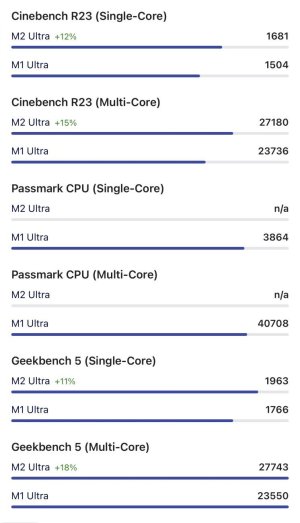
When he is combining M1 and M2 based Macs, and also mixing Ultra, Max and Pro processors,
and Studio, Mini and Macbook Pro models, he should go slower. The Logic part was less than a minute long – why don't they make more videos instead, and videos that are a little more in-depth than this one?
What he says about 'audio' can also be misleading for another reason: we (VI users) also work with audio, and often need a lot of power/cores/memory, while playing back audio files is a very different process. It's not only important to have a look at how many cores that are being used in this process, but these youtubers should also pay attention to, when doing stuff in Logic or other DAWs, which buffer size that is being used.
Another youtuber compared Logic performance between several Macs using a very high buffer size which ended up with very misleading results. I wish there was Ignore buttons on YouTube.