×
What's new

M1 Ultra vs M2 Max

Great, that’s the tests we actually need to see. Just people using their new machines for composing music.

Looks like you are using roughly around 1/3 to 1/2 of your system’s CPU power. Are you actually running 90 instrument tracks (Kontakt etc) directly on the system without VEP server or is there a fair chunk of audio tracks too? Looks like you are using an M2 Max (given the 4e-cores and 8c-cores)?
I have the M2 Max Studio Base model.

On that session I was using:

Battery 4 x 9
Logic Sampler x 9
Kontakt x 2
EZ Drummer 3 x 2
Dune 3 x 4
Spire x 5
Juno 106 Roland x 2
Jupiter 4 Roland x 1
Model 82 x 1
VPS Avenger x 2

There are about 80 effects in use also, but they're all varied, including eq, comps, reverbs etc.

There are about 40 audio tracks in use, with the rest being VI.
 
Thanks, that’s roughly around the size of my average project, maybe less Battery and more Kontakt in my case.
Looks like the M2 Max should easily handle a project twice the size of this, which is good to know.
 
Thanks, that’s roughly around the size of my average project, maybe less Battery and more Kontakt in my case.
Looks like the M2 Max should easily handle a project twice the size of this, which is good to know.
I could've made the session more efficient if I needed to, because I didn't really need 9 Batteries or 3 EZ Drummers for example. I could've consolidated some of those together.

But I can afford to be sloppy now, because I have the power at my disposal I guess. It's refreshing to work on music and not having to worry about which plugins I am choosing.
 
Curious as to your workflow. Is SSD speed is more important than CPU horsepower?

Perhaps video is your priority, in which case I should be clued in by your name...
So for me, in the past I have always gone for the max number of CPU's with speed greater than 2.8GHz (when turbo'ed or not), max RAM, max read/write speeds, and that seems to have worked fine for DAW work (composing / writing, initial mixing, stem production etc). My workstation was also used by our studio video editor for rendering, hence the need for internal SSD speeds etc - although that was when the team and I were all based from the same studio location. These days, the team is much much smaller (downsized due to COVID), and generally work from home or a client studio, so the editing / rendering need on my workstation is no longer so great, but having learned from our build experiences of 2017/18/19, I tend to follow the same principles.

For the DAW (mainly Nuendo these days), I still want rapid load times for instruments etc - less than an hour is best, so the faster the SSDs and faster the bus then the quicker we found the load times. With the release of Kontakt7 the load times were reduced down by something like 20%, so now my own template (of circa 2900 tracks with 80% instruments enabled) loads in less than 40 minutes - pretty good. Back in 2018 with our studio master template of 14,400 tracks the load time for each VEPro server averaged something like 2 to 2.5 hours - for x12 Windows Servers - that was alot of electricity, heat and noise!!!
 
Yeah. I felt a little bamboozled recently when I learned that real data transfer speeds of TB4 are actually close to half the advertised 40Gbps.

Nothing will ever beat PCIe but 23Gbps is plenty unless you're working with 8K/12K video files. And it's quite amazing to have that sort of speed in a laptop using an external port with power and video data.
Perhaps I missed it in an earlier post? Where or how are you storing your VI samples? Are you using 2.5" SSD drives in external enclosure's, or NVME's in a thunderblade external type of enclosure?

I agree, the datastream that needs to be supported by even the densest of VI's streaming samples is a fraction of what is needed to support 8K video editing. For that I am grateful. I am hoping a 192GB mac studio M2 ultra can get me back to being a one computer composer while still using VEPro, but in the same computer as my DAW. Right now I am using two late 2013 macpros and have all of my samples stored on three thunderbay mini's [across 12 two TB Samsung EVO drives] running at thunderbolt 2. When I upgrade my computer, and hope to run it all in one machine, I'm not sure I even NEED to switch to an NVME external enclosure to appreciate the TB 4 transfer rate differences. Will my samples/template load quicker?
 
Perhaps I missed it in an earlier post? Where or how are you storing your VI samples? Are you using 2.5" SSD drives in external enclosure's, or NVME's in a thunderblade external type of enclosure?
Currently just using the internal drive. But I'm more of a synth head and don't use lots of VI samples. My concern is mostly CPU usage, not so much RAM and storage.

When I upgrade my computer, and hope to run it all in one machine, I'm not sure I even NEED to switch to an NVME external enclosure to appreciate the TB 4 transfer rate differences. Will my samples/template load quicker?
You're using this, right?

What max speeds do you get? This is a great simple app to test disk speeds.

Assuming you're using SATA SSDs and getting like 500MB/s yeah you should see a big improvement in load speeds by switching to NVME and a Thunderbolt 3 or 4 enclosure.

SSDs only get max speeds when reading large files (sequential read) but going from SATA to NVME SSDs should double if not triple the current reading speed you're getting.
 
Currently just using the internal drive. But I'm more of a synth head and don't use lots of VI samples. My concern is mostly CPU usage, not so much RAM and storage.


You're using this, right?

What max speeds do you get? This is a great simple app to test disk speeds.

Assuming you're using SATA SSDs and getting like 500MB/s yeah you should see a big improvement in load speeds by switching to NVME and a Thunderbolt 3 or 4 enclosure.

SSDs only get max speeds when reading large files (sequential read) but going from SATA to NVME SSDs should double if not triple the current reading speed you're getting.
Ok..so the internal HD. Those are usually screaming fast, but no good for me. I always bench mark with the blackmagic app and use it for the occasional troubleshooting and yes, I do get 300-400MB/s write and 500MB/s read speeds with all of my drives that are very well used. Mostly Samsung 850pro's and 870 EVO's. As you said, VI's are little bits of data so nothing like the 1GB or 5GB sustained read/write that blackmagic performs. Greatly improved load times would be super....but I'm looking at around $5500 for a 32TB thunderblade which is almost the computer cost LOL. I probably would stick with my TB3 Thunderbay MIni's at first, benchmark the heck out of them and then I can always switch to the NVME thunderblade if I think I should be experiencing more performance. I just never know how much of the session loading time for VEPro/Digital Performer is the CPU having to think about each of the VI's to load vs the actual load time for loading the samples into RAM.
I'm also interested in read speed because a colleague told me that he revamped his VEPor template when he went to the 2019 Mac Pro to load the minimum preload into RAM because he was then streaming from NVME's [albeit internally installed on a PCIE bus] since those drives as he told me function nearly like RAM! He was able to spend less on RAM due to loading less of the VI samples and allowing more of the sample to stream from the disk instead of RAM.
My current VEPro usage is usually around 115GB of RAM when I'm done with a cue [if it's a bigger sounding one] so having 192GB of RAM in the mac studio, coupled with reducing the preload buffers could make for lots of RAM headroom. Time will tell. For $5500. that 32TB thunderblade better be mindblowingly faster than my TB3 thunderbay mini's.
 
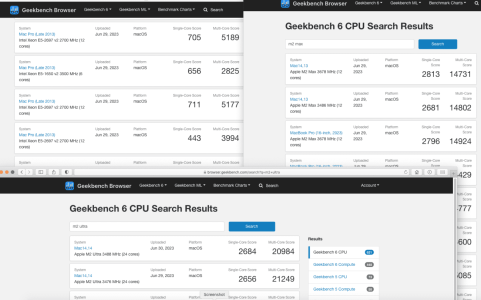
Funny that im coming from a mac pro 5,1. Topping at like 3k-5k in the benchmarks. while the max goes up to 14k multicore.
to me its all about the ram. both ultra and max seem about the same processing wise.. since my dinosour is chugging along and the m1 ultra, m2 max and m2 ultra are all so much better.
its just that 96gb of ram and thinking if it will be enough. if not, maybe later buy the m3 max which will probably get to 128gb of ram. thatsa the cool thing, ram gets cheaper (in a way) in every gen.


Screen Shot 2023-06-29 at 9.22.23 PM.png
 
improvement is that Apple added a memory controller chip to the M2 generation that balances the load between all of M2 Ultra’s cores – M1 Ultra required the ram to be maxed out before using all cores."
This excerpt is haunting me now that I’m choosing an m1 vs m2 for Logic Pro

Anyone know more about this? I googled it but it all comes back to that same article without much further info that maybe is relevant in context.
 
This excerpt is haunting me now that I’m choosing an m1 vs m2 for Logic Pro

Anyone know more about this? I googled it but it all comes back to that same article without much further info that maybe is relevant in context.
I guess the source is this article:

https://9to5mac.com/2023/06/16/m2-m...and-m2-ultra-nearly-doubles-that-performance/
With "max out the memory" they don't mean maxing out the config but maxing out the memory buffer.

"With M2 Ultra, because of this new memory controller, Apple can now achieve the same incredible performance without the memory buffer needing to be maxed out."

Of course the M2 chips will have some optimizations the M1 doesn't have but that is expected, no?
 
I guess the source is this article:

https://9to5mac.com/2023/06/16/m2-m...and-m2-ultra-nearly-doubles-that-performance/
With "max out the memory" they don't mean maxing out the config but maxing out the memory buffer.

"With M2 Ultra, because of this new memory controller, Apple can now achieve the same incredible performance without the memory buffer needing to be maxed out."

Of course the M2 chips will have some optimizations the M1 doesn't have but that is expected, no?
Im still not getting it. :(
At least in how it would affect audio apps and sample streaming and using ram memory.
I guess im wondering how much of an difference it is for our use case scenario where it could be an issue .
 
Im still not getting it. :(
At least in how it would affect audio apps and sample streaming and using ram memory.
I guess im wondering how much of an difference it is for our use case scenario where it could be an issue .
I wouldn't worry about a technicality in the logic board. Yeah of course the M2 is better but that's expected because it's the new gen.

Your decision is basically if you want to pay for more GPU performance and 192GB of RAM or not :)

The biggest improvement of the M2 Ultra is in the GPU which is massive. In CPU it's like 20-30% better, which is nice, but not life changing.

The M1 Ultra kicks ass. Specially for audio.
 
I wouldn't worry about a technicality in the logic board. Yeah of course the M2 is better but that's expected because it's the new gen.

Your decision is basically if you want to pay for more GPU performance and 192GB of RAM or not :)

The biggest improvement of the M2 Ultra is in the GPU which is massive. In CPU it's like 20-30% better, which is nice, but not life changing.

The M1 Ultra kicks ass. Specially for audio.
Good to know . The m1 still haven’t come down in price as much as I thought. (Yet) so both seem a close call
 
This excerpt is haunting me now that I’m choosing an m1 vs m2 for Logic Pro

Anyone know more about this? I googled it but it all comes back to that same article without much further info that maybe is relevant in context.
I don't see anything more about it either. My hunch is that DAWs have been distributing workload across cores for years, so if the cores are available, a DAW will use them. So, the more cores the merrier for our work. But, I know very little about benchmarks. I would be interested to see a test project with the CPU Usage Window of Activity Monitor open and tested on an M1 Max, an M1 Ultra, an M2 Max, and an M2 Ultra.
 
Last edited:
So I was wondering about this but instead of M1 ultra I was going for M2 Ultra vs M2 Max. I might be overthinking and would appreciate it if anyone could help me.

I want to replace my 2016 PC Machine and I decided to go for the MAC Studio.

So my sessions generally have around 100 tracks, multiple ampsims, synthethizers (mainly arturia), drum plugins and sometimes some orchestral elements.

I am between two architectures:

M2 Max 64 gB with 4TB of memory
or M2 ultra base settings (64 gb and 1 TB)

My thinking process is that the extra cores would help in the long term and with more tracks.

While I like the idea of having more internal storage, I wouldn't mind trading it for the ultra if the performance gain was needed it and was worth it, and use some external nvme SSDs to compensate for that.

Do you think I would have problems in the future by going with the Max or would you go for the ultra?

Thank you in advance!
 
So my sessions generally have around 100 tracks, multiple ampsims, synthethizers (mainly arturia), drum plugins and sometimes some orchestral elements.
This is similar to my workload and the M2 Max should be able to handle it easily, which is why I decided to go with that.

That said, if you are planning to spend the money that an M2 Ultra base config costs anyway and are not sure whether to spend it on the Ultra or a Max with more storage, I would definitely go with the Ultra!

What Apple charges for extra storage is overpriced and with all the ports you get on the Mac Studio, adding a couple of 2TB SSDs (or 1 4TB SSD) is a nobrainer. And if you go with m.2 nvme in thunderbolt enclosure you get up to half the read/write speed of the internal drive (which is still plenty!) for a fraction of the cost.

While both computers should be able to handle your workload now, the Ultra may last a couple years longer (unless single core performance becomes a bottleneck) and is likely the better investment. And you can always add more external storage when you need it (+ SSD becomes cheaper and cheaper).
 
This is similar to my workload and the M2 Max should be able to handle it easily, which is why I decided to go with that.

That said, if you are planning to spend the money that an M2 Ultra base config costs anyway and are not sure whether to spend it on the Ultra or a Max with more storage, I would definitely go with the Ultra!

What Apple charges for extra storage is overpriced and with all the ports you get on the Mac Studio, adding a couple of 2TB SSDs (or 1 4TB SSD) is a nobrainer. And if you go with m.2 nvme in thunderbolt enclosure you get up to half the read/write speed of the internal drive (which is still plenty!) for a fraction of the cost.

While both computers should be able to handle your workload now, the Ultra may last a couple years longer (unless single core performance becomes a bottleneck) and is likely the better investment. And you can always add more external storage when you need it (+ SSD becomes cheaper and cheaper).
Thanks for the reply! That was super helpful.

I'm trying to make this to last for a long period, so I am sure that the ultra would probably last longer. It's good to know the M2 MAX can handle it easy!

I think I will try to make a decision on the SPECS during next week. I'm still not sure if I'll ever use the Ultra potential as I do not need the extra GPU power.
 
Reviving this as now the dust has settled a little I am hoping that some ‘real world’ examples of the differences are available. Anyone seen one?
 
Back
Top Bottom