×
What's new

13900kf low Cinebench score

60C under sustained full multicore load?

I'm surprised you would get those temps having a single air intake (I assume either the front or back fan on the case) and apparently a small CPU cooler. The 13900KF can reach up to 250W of TDP.

But then how do you explain the low Cinebench scores?

Also try pushing the CPU with Prime95 instead of Cinebench.

You could also try monitoring with this Intel utlity which will show you lots of data. If you see the clock speed rising and then going down there's throtlling.
It's a relatively new system so I haven't yet used it to max load (like with heavy Davinci Resolve projects or big 96k audio sessions with Acustica plugins). But under normal use those are the temperatures I get. I noticed there are still 2 available fan headers I could use in case I needed it, I could probably install another 80mm fan, which could be an option because I want to install a 3rd m.2 nvme ssd for video editing. For some reason the Intel utility doesn't install...
my initial post was referring to a score of about 29.000, but this was the 10min test. The one shot test gives me a bit more than 35.000 which is more acceptable. I'd like to know though if a bit of undervolting could help. Also do you recommend using ParkControl ? It seemed to make a difference with the 10min test, a lot less with the one shot.
 
If you you use a machine only for DAW on my system : 13900k + 660 + Air cooler I don’t have throttling in a real daw scenario , I have more power of a Mac Studio full optional ( for audio job ), and I spent 2900 euros and not 6000 euro
What I mean is, why bother with the top of the line high end chip when you can't or don't really need to push it even close to 100%?

Wouldn't it make more sense to simply get a cheaper CPU that is easier to cool more in accordance with the rest of the system?

I'd like to know though if a bit of undervolting could help. Also do you recommend using ParkControl ? It seemed to make a difference with the 10min test, a lot less with the one shot.
Sorry, no idea. Never used it myself.
 
But what's the point of having a very powerful CPU if you can't use it fully without throttling?
Hi Pier, we have several threads on this regarding the 13900K/KF. It's designed to run up to 100C but really we need to keep it at 95C or lower, and even with a single fan air cooler, that's totally doable. The PROBLEM is, the motherboard manufacturers dropped the ball heavily on this platform and many are driving too much voltage into the CPU. We all know now to undervolt the CPU which makes it run like a champ. I went from banging my head into 100C on a full Cubase stress test which pinned the CPU at 100% sustained, to cruising along happily at 75-85C, sometimes 90C for a moment, with zero throttling and the system running at the speeds it's supposed to, with the undervolt bit (especially with the ParkControl app that keeps all 24 cores alive and ready).

The OP's issue is (as I understand it), the PC purchased came with a lower end DDR4 motherboard that doesn't have the full-blown BIOS to undervolt properly. So that's why the excessive heat. It's not the cooling tower or the case (I have a BeQuiet case and run on air), it's the mobo manufacturer ramming 1.21 gigawatts into the CPU, lol.

NOW, if the mobo manufacturer would release an updated BIOS with the voltage issue fixed, then the problem would be solved! The reason I think they hold back is because the gaming community would jump all over them... "why are you cutting the power to the CPU?? We need all the power we can get!". Just a guess on my part but these manufacturers cater to the gaming world first because they outnumber audio users by 40 million, lol.

And that's a big reason why people are getting Apple Silicon Macs...
FWIW, my decently quiet $5,300 PC that I recently built would have cost me $11,999 with AppleCare for the nearly identical rig if I went for the Mac Pro, so while I was a longtime fanboy going back to my non-backlit MacPortable in 1990, that's a big chunk of goulash just to have the Mac OS. OK, you can yell back at me now. :thumbsup:
 
Last edited:
Wouldn't it make more sense to simply get a cheaper CPU that is easier to cool more in accordance with the rest of the system?
Well, as others said, even with audio only, those cores will soon get much hotter, just a bit or orchestral libraries is all it's needed sometimes... plus, I hope this system will last at least couple years...
 
Hey @stevegalante, I wouldn't put so much stock in Cinebench for rating a DAW PC, LatencyMon gave you good results. Fire up your DAW and start composing, lol!
ah ah right... at this point I just want to be prepared in case a bit more cooling is required or if a bit of undervolting could help. To me it's like with power amps, you buy one capable of giving you 500W to use it at max half of its power
 
Hi Pier, we have several threads on this regarding the 13900K/KF. It's designed to run up to 100C but really we need to keep it at 95C or lower, and even with a single fan air cooler, that's totally doable. The PROBLEM is, the motherboard manufacturers dropped the ball heavily on this platform and many are driving too much voltage into the CPU. We all know now to undervolt the CPU which makes it run like a champ. I went from banging my head into 100C on a full Cubase stress test which pinned the CPU at 100% sustained, to cruising along happily at 75-85C, sometimes 90C for a moment, with zero throttling and the system running at the speeds it's supposed to, with the undervolt bit (especially with the ParkControl app that keeps all 24 cores alive and ready).

The OP's issue is (as I understand it), the PC purchased came with a lower end DDR4 motherboard that doesn't have the full-blown BIOS to undervolt properly. So that's why the excessive heat. It's not the cooling tower or the case (I have a BeQuiet case and run on air), it's the mobo manufacturer ramming 1.21 gigawatts into the CPU, lol.

NOW, if the mobo manufacturer would release an updated BIOS with the voltage issue fixed, then the problem would be solved! The reason I think they hold back is because the gaming community would jump all over them... "why are you cutting the power to the CPU?? We need all the power we can get!". Just a guess on my part but these manufacturers cater to the gaming world first because they outnumber audio users by 40 million, lol.


FWIW, my decently quiet $5,300 PC that I recently built would have cost me $11,999 with AppleCare for the nearly identical rig if I went for the Mac Pro, so while I was a longtime fanboy going back to my non-backlit MacPortable in 1990, that's a big chunk of goulash just to have the Mac OS. OK, you can yell back at me now. :thumbsup:
That’s right, Indeed I did just a little bit of undervolt ! And I have more stable performances.
 
ah ah right... at this point I just want to be prepared in case a bit more cooling is required or if a bit of undervolting could help. To me it's like with power amps, you buy one capable of giving you 500W to use it at max half of its power
I agree. I use a 1000w power supply in my towers even though the PSU Calc on most sites says 750w is ample (have a huge GPU for Flight Sim, lol), so my thinking is to get a power supply that will yawn at whatever I throw at it.
 
That’s right, Indeed I did just a little bit of undervolt ! And I have more stable performances.
Nice!

We keep mentioning "Undervolting the CPU" but I realize that some folks might be wondering what settings get affected. The BIOS will be different in boards of course, but here's what was needed for my MSI Carbon WiFi Z790, using the AMI BIOS:
  • CPU Cooler Tuning to Water (even though I use a Noctua NH-D15... this setting allows full power with no cap)
  • CPU Core Voltage: 1.300 (don't use Auto)
  • CPU Loadline Calibration Control: Mode 5 (allows the LLC to droop to level 5)
  • BCLK 100MHz Lock On: Enabled (locks the BaseClock at 100MHz)
I have a few other settings I change having to do with specifically assigning PCIe 4 or 3 to specific M.2 slots, but those don't have anything to do with CPU voltage or heat.

The only frustrating part is, you have to go back in and set everything up after each BIOS update, although you usually can save the profile to a USB stick, then load 'er back up after the update.
 
Nice!

We keep mentioning "Undervolting the CPU" but I realize that some folks might be wondering what settings get affected. The BIOS will be different in boards of course, but here's what was needed for my MSI Carbon WiFi Z790, using the AMI BIOS:
  • CPU Cooler Tuning to Water (even though I use a Noctua NH-D15... this setting allows full power with no cap)
  • CPU Core Voltage: 1.300 (don't use Auto)
  • CPU Loadline Calibration Control: Mode 5 (allows the LLC to droop to level 5)
  • BCLK 100MHz Lock On: Enabled (locks the BaseClock at 100MHz)
I have a few other settings I change having to do with specifically assigning PCIe 4 or 3 to specific M.2 slots, but those don't have anything to do with CPU voltage or heat.

The only frustrating part is, you have to go back in and set everything up after each BIOS update, although you usually can save the profile to a USB stick, then load 'er back up after the update.
Ugh.... not that easy !!!!
 
The OP's issue is (as I understand it), the PC purchased came with a lower end DDR4 motherboard that doesn't have the full-blown BIOS to undervolt properly. So that's why the excessive heat. It's not the cooling tower or the case (I have a BeQuiet case and run on air), it's the mobo manufacturer ramming 1.21 gigawatts into the CPU, lol.
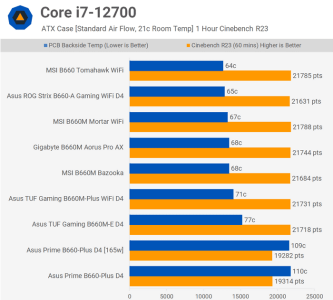
I'm not sure the VRM on the Asus Prime B660 can quite manage all that pumping . . .

13900kf low Cinebench score
 
I'm not sure the VRM on the Asus Prime B660 can quite manage all that pumping . . .

13900kf low Cinebench score
yes

the VRM of the Asus Prime B660 is poor for a 13900k I Know.

It's also worth mentioning that these tests really push the machines to their limits.

In real-life situations of musical use, I've never had major temperature issues with the machine I'm using, which features a 13900k CPU and an Asus 660. Surely, it's not an ideal combination.

In fact, when I bought the machine, I was quite disappointed with the chosen motherboard.

However, I must also say that after 1 year of usage, I've never encountered any significant problems, and I'm able to work quite effectively.
 
Last edited:
[*]CPU Loadline Calibration Control: Mode 5 (allows the LLC to droop to level 5)

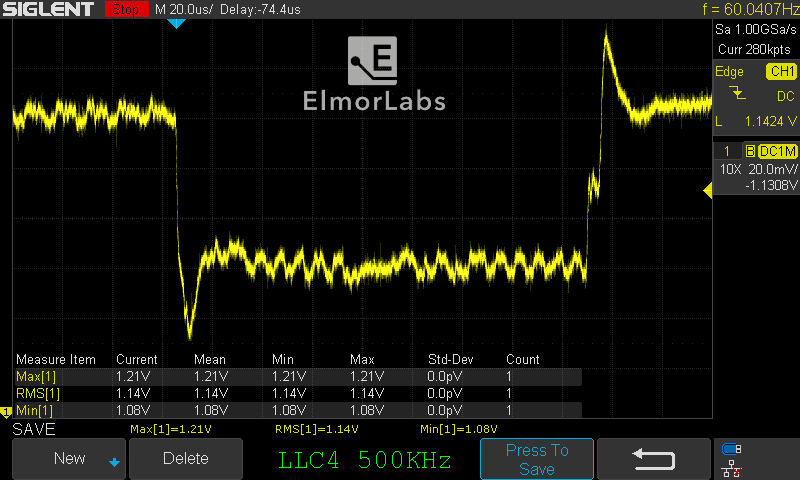
LLC level 5 is not the same level in every brand.
13900kf low Cinebench score

I prefer to use less aggressive LLC or leave it to AUTO.
https://elmorlabs.com/2019-09-05/vrm-load-line-visualized/13900kf low Cinebench score

But I like to keep all VRM phases ON, in the ASUS BIOS it is: (Better signal, but more heat)
VDDCR CPU Power Phase Control = Extreme
VDDCR SOC Power Phase Control = Extreme

Higher VRM Switching frequency: (Better signal, but more heat)
VDDCR CPU Switching Frequency [350] (If the default is higher, keep the default)
VDDCR SOC Switching Frequency [350] (If the default is higher, keep the default)

IF possible I also like to disable any Spread Spectrum.
 
yes

the VRM of the Asus Prime B660 is poor for a 13900k I Know.


In fact, when I bought the machine, I was quite disappointed with the chosen motherboard.
OMG I didn't even know what a VRM is LOL....
another point in favour of this "professional" builder... ha ha never again
As the song goes "you live you learn", at this point I'm pretty sure I'd have a much better machine by building it myself, with better components (at this point I'm starting questioning the whole build) and probably at the same price. At least they could have pushed the price by 100$ (especially for 13900k) and give us a decent mobo...:emoji_japanese_goblin::emoji_japanese_goblin::emoji_japanese_goblin:
 
LLC level 5 is not the same level in every brand.
13900kf low Cinebench score

I prefer to use less aggressive LLC or leave it to AUTO.
https://elmorlabs.com/2019-09-05/vrm-load-line-visualized/13900kf low Cinebench score

But I like to keep all VRM phases ON, in the ASUS BIOS it is: (Better signal, but more heat)
VDDCR CPU Power Phase Control = Extreme
VDDCR SOC Power Phase Control = Extreme

Higher VRM Switching frequency: (Better signal, but more heat)
VDDCR CPU Switching Frequency [350] (If the default is higher, keep the default)
VDDCR SOC Switching Frequency [350] (If the default is higher, keep the default)

IF possible I also like to disable any Spread Spectrum.
GREAT info, I only really know MSI boards. 👍🏼
 
LLC level 5 is not the same level in every brand.
13900kf low Cinebench score

I prefer to use less aggressive LLC or leave it to AUTO.
https://elmorlabs.com/2019-09-05/vrm-load-line-visualized/13900kf low Cinebench score

But I like to keep all VRM phases ON, in the ASUS BIOS it is: (Better signal, but more heat)
VDDCR CPU Power Phase Control = Extreme
VDDCR SOC Power Phase Control = Extreme

Higher VRM Switching frequency: (Better signal, but more heat)
VDDCR CPU Switching Frequency [350] (If the default is higher, keep the default)
VDDCR SOC Switching Frequency [350] (If the default is higher, keep the default)

IF possible I also like to disable any Spread Spectrum.
Great article by Elmor Labs, had to go over it a couple times to really get it. My system is quite stable but from what I just read, there’s no reason for me to set the LLC at Mode 5. Maybe my board is forgiving enough for it not to cause a problem, but I’m going to retest on Mode 2 and also Auto to see what the difference is. And also see where I’m at with the other settings you put.

You DO realize that if you assembled The Pictus Ultimate Motherboard Tuning PDF eBook and give us a link to purchase it, I’d be your first customer. I’m pretty decent at assembling overall systems, but motherboard bios settings is still an area I don’t fully understand.
 
OMG I didn't even know what a VRM is LOL....
another point in favour of this "professional" builder... ha ha never again
As the song goes "you live you learn", at this point I'm pretty sure I'd have a much better machine by building it myself, with better components (at this point I'm starting questioning the whole build) and probably at the same price. At least they could have pushed the price by 100$ (especially for 13900k) and give us a decent mobo...:emoji_japanese_goblin::emoji_japanese_goblin::emoji_japanese_goblin:
Well, the issue isn't simple.

our mutual friend definitely could have used at least a 690;

I would have preferred to pay an extra 300 euros but have an excellent motherboard.

I must also mention that other DAW manufacturers I've found for similar products (but with a 690) even charge an additional $1000 compared to what I paid with a similar machine.

So, in terms of price, our manufacturer is excellent. In terms of assembly quality, it's good.

However, in terms of component choice, especially on the motherboard, it falls short.

I also had the opportunity to express this. The response they gave me is partially understandable, but partly not.

The core point being that the actual performance increase in the field of audio and music production with a 690 or 790 motherboard ( with no overclock ) compared to a 660 motherboard is marginal.


This is partly true.

Many of the tests we see are just numbers. They are lab tests, not real-world scenarios.

The true test would be to take a session and run it on two machines with 13900K processors, one with a 660 motherboard and one with a 690/790, and see the actual difference between the two in terms of the number of plugins/tracks that can be opened simultaneously.

I believe the difference wouldn't be enormous.

Of course, if I'm spending 3000 euros, I expect to have at least a decent motherboard, not an entry-level one.

So on this aspect, even on a matter of principle, I'm a bit disappointed.

They should at least offer the option to choose.
 
Last edited:
You DO realize that if you assembled The Pictus Ultimate Motherboard Tuning PDF eBook and give us a link to purchase it, I’d be your first customer. I’m pretty decent at assembling overall systems, but motherboard bios settings is still an area I don’t fully understand.

Thank you, but it is above "my pay grade".
 
Back
Top Bottom