×
What's new

13900kf low Cinebench score

Of course I could consider swapping the mobo myself, if there's a way to keep all my software and plugins installations and data.

Ack, unfortunately, no... the CPU and Mobo combination creates a unique ID called a GUD and Microsoft uses that to identify a PC and verify the Windows license. You'l basically need to do a full Windows reinstall, and then reinstall all of your plugins, software, etc.
Actually, there is a way you can switch your motherboard and cpu without reinstalling but it depends on whether you have a retail vs oem version of Windows. At least with Win10, if you tie your license to your Microsoft ID and you have a retail license, my experience is it will boot cycle a couple of times, then you sign in with MS ID and it validates. You might not want to do this as it leaves files that were associated with the old mobo. (from what I have read) It worked fine for me when I upgraded my mobo and cpu a few months back. I had just went through the reinstall process end of last year and wasn’t about to do it again. Computer is solid and performing well. That being said, definitely listen to @PaulieDC, from reading his posts, I think he may have forgotten more than I know about it. Unfortunately, if you have the oem version, you would have to reinstall at least and you could have issues with authentication.
 
Actually, there is a way you can switch your motherboard and cpu without reinstalling but it depends on whether you have a retail vs oem version of Windows. At least with Win10, if you tie your license to your Microsoft ID and you have a retail license, my experience is it will boot cycle a couple of times, then you sign in with MS ID and it validates. You might not want to do this as it leaves files that were associated with the old mobo. (from what I have read) It worked fine for me when I upgraded my mobo and cpu a few months back. I had just went through the reinstall process end of last year and wasn’t about to do it again. Computer is solid and performing well. That being said, definitely listen to @PaulieDC, from reading his posts, I think he may have forgotten more than I know about it. Unfortunately, if you have the oem version, you would have to reinstall at least and you could have issues with authentication.
That’s my grump with windows 11, it’s not as forgiving. You are absolutely correct. You could do that with windows 10. Windows 11 gets stupid when it senses a hardware change in the Microsoft online ID won’t activate. That’s just one of the downsides of 11, for the most part. It’s actually quite good in a few areas, especially the thread Director interaction with the 13th GEN CPUs, I don’t have solid proof, but it just seems to work better. that is, after we make 147 changes to the BIOS. 😂😂
 
You're right... but my use as a daw is pretty demanding (lots of plugins, orchestral stuff, vep, acustica, mastering, etc.) and I'm also using it as a video editing platform with Davinci Resolve.
But most of all I wanna know if I'm "wasting" about 30% of the potential multicore performance of the CPU because of the motherboard...
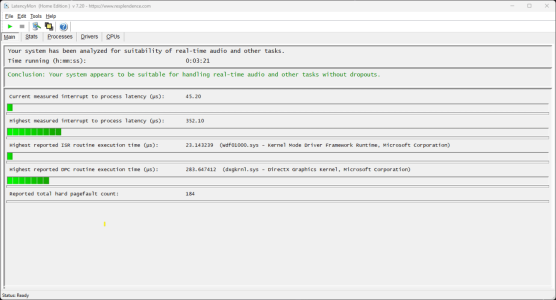
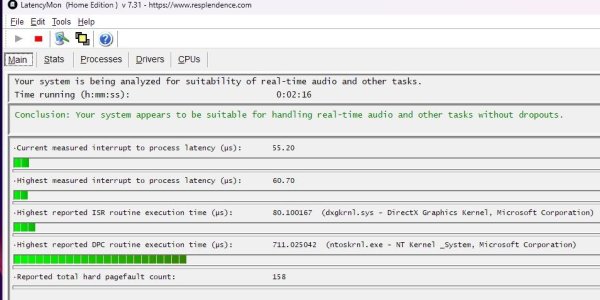
So I downloaded Cinebench, and I see what others are talking about... it's really a tool for hammering your system for video playback and editing, doesn't really apply to our world as much. LatencyMon is a more popular tool, although some think that it can give false readings, which could be true. But my rig was failing miserably before I did any tuning, interrupts and page faults in the thousands. Once I did the undervolt in the BIOS and used the ParkControl app to easily create an ultimate power plan and not allow any cores to park, it made a huge difference. Oh, I also uninstalled the NVidia GAMING driver and instead installed the STUDIO driver, which is for content creators and very well tested and more stable. Anyhoo, here's the latest LatencyMon result:

1692601964391.png

It really points back to having a motherboard you can really adjust. What's aggravating is, the mobo manufacturers should have this sorted out by now and have the fix in their latest BIOS releases. MSI has NOT (my brand) and that could hold true for other makers, not entirely sure. If your motherboard maker would just fix the settings in the BIOS, you could update that and BOOM, no throttling due to temps.

BTW: Have you run LatencyMon? I would and see how that goes. Let it run for at least three minutes. AND I would install the ParkControl app so you can DISABLE all core parking. Then run LatencyMon again and see how it improves. This would be a good way to test your system and at least get a better picture of how the rig is running.
 
That’s my grump with windows 11, it’s not as forgiving. You are absolutely correct. You could do that with windows 10. Windows 11 gets stupid when it senses a hardware change in the Microsoft online ID won’t activate. That’s just one of the downsides of 11, for the most part. It’s actually quite good in a few areas, especially the thread Director interaction with the 13th GEN CPUs, I don’t have solid proof, but it just seems to work better. that is, after we make 147 changes to the BIOS. 😂😂
Good to know that about Win11, I am looking to migrate over soon, as it seems like there are some advantages. I put in a MSI z790 Edge and a i7-13700K. Sounds like I will be going through the other thread to see about changes to BIOS. And man, the bit about the Thermalright cpu frame in your build thread, golden!!!
 
Once I did the undervolt in the BIOS and used the ParkControl app to easily create an ultimate power plan and not allow any cores to park, it made a huge difference. Oh, I also uninstalled the NVidia GAMING driver and instead installed the STUDIO driver, which is for content creators and very well tested and more stable. Anyhoo, here's the latest LatencyMon result:
Thank you, so in ParkControl you set all 4 tabs to "disabled" ? And what's the best way to uninstall the NVidia Gaming driver ? Tested the system with LatencyMon, not great results....
 
Thank you, so in ParkControl you set all 4 tabs to "disabled" ? And what's the best way to uninstall the NVidia Gaming driver ? Tested the system with LatencyMon, not great results....
ParkControl is good, I also recommend
https://vi-control.net/community/th...se-with-more-recent-gpus.139234/#post-5336215Before do any tweak or remove the GPU driver, better create a System Restore Point.
https://www.elevenforum.com/t/create-system-restore-point-in-windows-11.3602/
The best way to remove a GPU driver is with DDU
https://www.wagnardsoft.com/display-driver-uninstaller-DDU-https://www.wagnardsoft.com/content/DDU-Guide-Tutorial
BTW, Latencymon is now version 7.31
https://resplendence.com/latencymon
 
Even among B660 D4 motherboards, the Asus Prime is not a good performer. A little bit extra for an Asus Tuf Gaming would have improved things quite a bit. I think the builders have cut the wrong corners and put a Porsche engine in a VW Beetle . . .
I know... but to be honest with you they don't even tell you which exact components they'll use, they only tell you they are all tested and optimized for stability. For sure my next one I'll build it myself.
 
If you simply bought a new DDR4 Z790 motherboard (this one as an example) and tube of thermal paste, you could swap that out, keep your ram, reassemble/reinstall and you're done. Big pain but not really another option. Then we can help you undervolt the 13900 so you won't throttle out, turn off the thing where cores park themselves, and your performance would be much improved.

If you want to go that route, you'll want to do a few things first like create Windows install media, etc. We'll provide links for all that. The important thing to know is: did this place give you the Windows License Key, AND, which PC case did they use? The license key is still important because when Microsoft detects a hardware change, often they won't activate Windows 11 from your Digital License in your account. This has happened TWICE to me after MSI Mobo BIOS updates. I simply enter the key and it's good. Still a good argument to by the DVD, lol.

I know this is a lot to throw your way. Think about and and see what others on here suggest, and one way or onother we'll get you... um... up to speed. ;)
Thank you, I'll make sure to get the Windows License key. The case is a rack actually. Supposedly it was "better" to hold my 4 SATA HDD drives, but in reality I had to buy an external (Sabrent) 5-bays enclosure and connect it via the USB 3.2gen2 port.
 
Good to know that about Win11, I am looking to migrate over soon, as it seems like there are some advantages. I put in a MSI z790 Edge and a i7-13700K. Sounds like I will be going through the other thread to see about changes to BIOS. And man, the bit about the Thermalright cpu frame in your build thread, golden!!!
I built a smaller PC for my wife with a 12600K and a simply Hyper 212 cooler and the paste that comes with the frame, and it idles at 21-22C, seriously. Another member on here got a system built over in Germany with the same CPU and mobo as mine but of course with no frame, because the place who built it went on about the warranty, etc etc. The system had heat issues of course, even before undervolting. He pulled the cooler and CPU, put in that frame and the difference in temps was remarkable. If there's any one tip I got from the guy Steve on the GamersNexus YoutTube channel, it was that brilliant $10 frame!
 
Thank you, what settings do you recommend ?
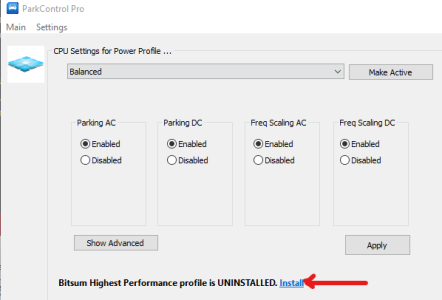
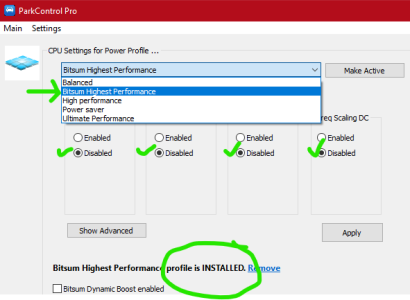
After you install it, you can have the app install a Windows Power Plan that basically has every setting needed to run full throttle. Click install where you see the red arrow, then change your power plan at the top to the new Bitsum plan it just installed, make it Active and you are done. You'll see that all core park settings will go to disabled, which is what you want.

There are manual ways to achieve all of this, but this app makes it so easy, and the cheap license covers 5 PCs (thanks @lokotus for showing me this app!). Just make sure your right-click the app and Run as Administrator. They don't require it but to me, system changes need admin rights.

BEFORE:
1692636295389.png


AFTER:
1692636203939.png
 
Last edited:
And what's the best way to uninstall the NVidia Gaming driver ?
Go to the NVidia site and download the "clean" driver which is the Studio Driver. You just select that from the DropDown List:

https://www.nvidia.com/Download/index.aspx?lang=en-us
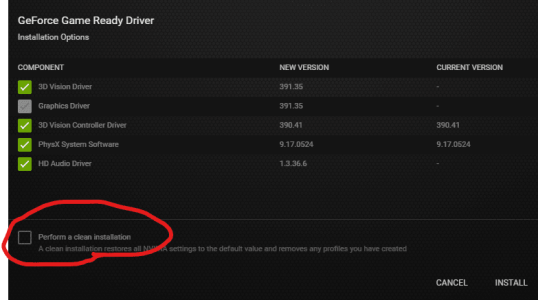
THEN, when you go to install it, it'll pop up and ask "Express" or "Custom" install (at least, I see that when I use the GEForce Experience app). Choose Custom, and on the next window, under the list of drivers that will be installed, you'll see a CheckBox for "Perform a Clean Install". That will clear out the barn and install the new drivers.

1692644006429.png

I always do that on a driver update on my DAW tower. I can NEVER do that on my laptop because I use that for Photoshop work and I have my screen calibrated with a SpyderColor colorimeter for print matching. If I Perform Clean, I'll wipe out the cal. Just mentioning that so you know how it works. :)
 
Last edited:
After you install it, you can have the app install a Windows Power Plan that basically has every setting needed to run full throttle. Click install where you see the red arrow, then change your power plan at the top to the new Bitsum plan it just installed, make it Active and you are done. You'll see that all core park settings will go to disabled, which is what you want.

There are manual ways to achieve all of this, but this app makes it so easy, and the cheap license covers 5 PCs (thanks @lokotus for showing me this app!). Just make sure your right-click the app and Run as Administrator. They don't require it but to me, system changes need admin rights.
Quick update :
- I just made a little change in the BIOS, enabling Hyperthreading (it was disabled), but nothing really changed.
- I installed ParkControl and set it to Bitsum Highest Performance (all 4 disabled) and it started to make a little difference.
I ran the Cinebench 23 test and it went up in multicore from 26.779 to 29.281, not much but 10% better. Also single core was slightly better (from 1985 to 2035).
Also LatencyMon performed better (attaching report).
I ran another benchmark test called Geekbench 6, but results were pretty much the same before/after ParkControl (2869 single core and 16115 multicore).
I noticed with Cinebench / multicore test on the first pass a few of the core went up to 85-88 C, then from the second pass all go significantly lower, in the 60-70C range, I guess it's normal...
 

Attachments

  • 13900kf low Cinebench score
    Latencymon.jpg
    72.7 KB · Views: 8
I always do that on a driver update on my DAW tower. I can NEVER do that on my laptop because I use that for Photoshop work and I have my screen calibrated with a SpuderColor colorimeter for print matching. If I Perform Clean, I'll wipe out the cal. Just mentioning that so you know how it works. :)
Thank you for your suggestion, I'll try it for sure. Do you think this is going to influence the CPU besides the GPU ?
 
Steve….

I think the “problem” is just a bios setting

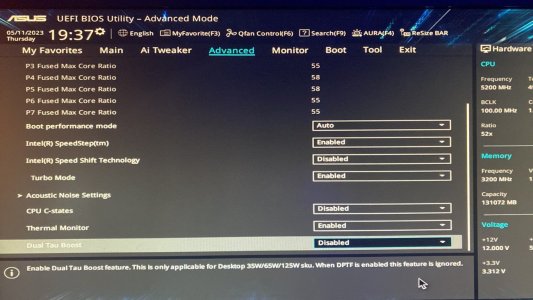
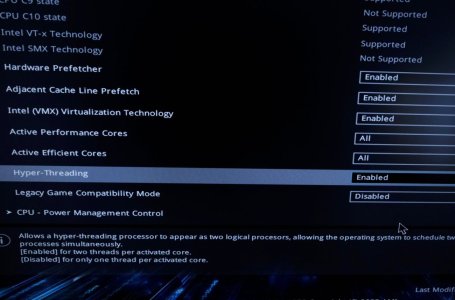
You say that the HT was disable and now nothing is changed. This is pretty strange. Are you sure is it enabled? Are you sure that are you using all the cores? Do you have disabled the Cstate?

Do you have the turbo boost enabled?
Check also the speed shift ( must be off )
check the speed step ( must be on )

I have quite the same machine ( 13900k on 660) I do about 36.000 points with R23


IMG_5161.jpeg


I did also a little bit of undervolt but my cpu is a little bit different !


IMG_5159.jpeg
 
Last edited:
ha ha you're here too LOL ?? Let me check everything... thanks !
Yep…

:2thumbs:

anyway I think you are not using all the cores , this is why 29.000


of course the 660 is not the best Mobo for a 13900k/kf but 29.000 is not normal, you should have about 36.000 in multi core.
 
Last edited:
Yep…

:2thumbs:

anyway I think you are not using all the cores , this is why 29.000


of course the 660 is not the best Mobo for a 13900k/kf but 29.000 is not normal, you should have about 36.000 in multi core.
Hey, I was joking, of course I came to this website through one of your videos LOL
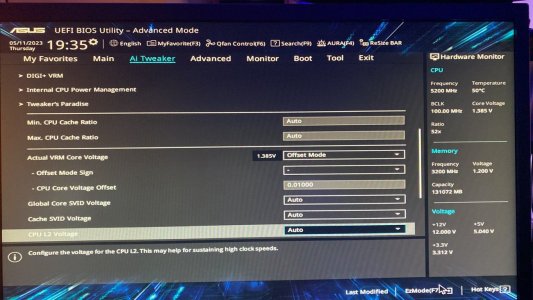
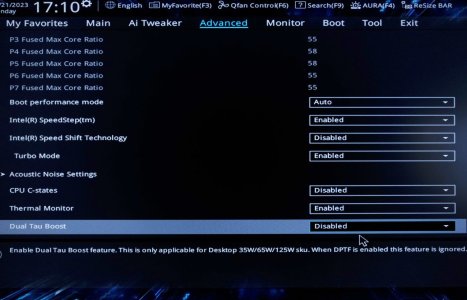
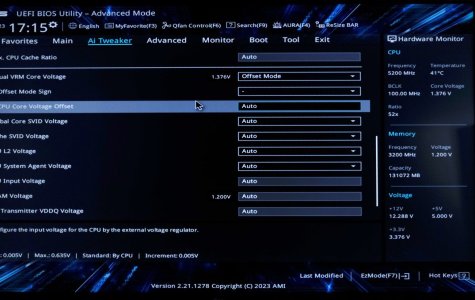
Anyways, yes the HyperThreading is enabled and, apart from undervolt, all the other settings were exactly as you said (attaching pictures). When I go to undervolt I can set it to offset mode but then I cannot change the CPU Core Voltage Offset (it stays at "Auto").
This, if I have done everything correctly...
When you test the Cinebench r23 and you get 36.000 do you do just one pass or the 10minutes test ? I do the 10min but I noticed when I do just one pass the score is much higher...
Do you use the ParkControl app ?
 

Attachments

  • 13900kf low Cinebench score
    BIOS VARIOUS.jpg
    111.7 KB · Views: 8
  • 13900kf low Cinebench score
    HYPER.jpg
    105.1 KB · Views: 8
  • 13900kf low Cinebench score
    UNDERVOLT.jpg
    127.9 KB · Views: 8
Thank you for your suggestion, I'll try it for sure. Do you think this is going to influence the CPU besides the GPU ?
It'll simply run better on the system. The Studio driver is highly tested and doesn't include souped-up beta features that are present in the gaming version. It's made for content creators who are more interest in stability (us) than tweaking out every last known bit of power (gamers).
 
Back
Top Bottom