Thanks, so no need to "uninstall" the gaming ones, right ?It'll simply run better on the system. The Studio driver is highly tested and doesn't include souped-up beta features that are present in the gaming version. It's made for content creators who are more interest in stability (us) than tweaking out every last known bit of power (gamers).

You are using an out of date browser. It may not display this or other websites correctly.
You should upgrade or use an alternative browser.
You should upgrade or use an alternative browser.
13900kf low Cinebench score
- Thread starter stevegalante
- Start date
- Watchers 10

PaulieDC
One of these days I'll have this all figured out.
Right, AFAIK, the Clean option does the trick.Thanks, so no need to "uninstall" the gaming ones, right ?
Done !Right, AFAIK, the Clean option does the trick.

StefanoM
Senior Sound Designer & Composer
The 10 minutes test is a different test ( stress test) . Not useful now , you are not doing overclock or testing the thermal throttling.Hey, I was joking, of course I came to this website through one of your videos LOL
Anyways, yes the HyperThreading is enabled and, apart from undervolt, all the other settings were exactly as you said (attaching pictures). When I go to undervolt I can set it to offset mode but then I cannot change the CPU Core Voltage Offset (it stays at "Auto").
This, if I have done everything correctly...
When you test the Cinebench r23 and you get 36.000 do you do just one pass or the 10minutes test ? I do the 10min but I noticed when I do just one pass the score is much higher...
Do you use the ParkControl app ?
Run the the multi core test for One Shot rendering ( you have to activate the advanced setting in R23 and set to off the time ) , I do about 36.000
Last edited:
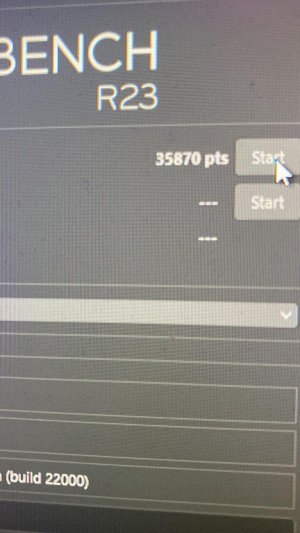
Ok in this case I got 35.142. In the right ballpark I think !The 10 minutes test is a different test ( stress test) . Not useful now , you are not doing overclock or testing the thermal throttling.
Run the the multi core test for One Shot rendering ( you have to activate the advanced setting in R23 and set to off the time ) , I do about 36.000
StefanoM
Senior Sound Designer & Composer
Ok, 35.142 for a 660 it is ok!Ok in this case I got 35.142. In the right ballpark I think !
I have a bit a Higher value because Probably I have a bit of undervolt!
For the best performance ( about 40.000 points) only with a 690 or 790.
Keep in mind with a
Apple Mac Studio M2 Ultra 76-GPU (2023) |
You get about 28.500 in multi core with R23
Last edited:

Pier
kiffaudio.com
So it seems your machine is heavily throttling when pushing the CPU with a sustained workflow.Ok in this case I got 35.142. In the right ballpark I think !
Unlike bursty workflows, audio is mostly sustained. Many plugins will keep consuming CPU even if you're not playing your project.
How's the cooling situation in this machine? What CPU cooler do you have? How many fans in the case?
StefanoM
Senior Sound Designer & Composer
So it seems your machine is heavily throttling when pushing the CPU with a sustained workflow.
Unlike bursty workflows, audio is mostly sustained. Many plugins will keep consuming CPU even if you're not playing your project.
How's the cooling situation in this machine? What CPU cooler do you have? How many fans in the case?
If it is the same machine we have a good air CPU cooler , but not the best CPU air cooler.
2 fans on the top , 1 fan on the CPU
No liquid cooler
The " problem " on this PC is the VRM of the Asus B660 that is not the best.
Last edited:
Pier
kiffaudio.com
If the air CPU cooler is not receiving fresh air (from the fans in the case) it won't be able to work properly. The radiator will be "cooled" with the hot air accumulating in the case. A mediocre air cooler with good case airflow will work better than the best cooler with bad case airflow.If it is the same machine we have a good air CPU cooler , but not the best CPU air cooler.
Personally I've never bothered with liquid cooling but case airflow is also an important matter to consider. Even if the radiator is used as air input (directly consuming fresh air) you can't really let the hot air accumulate inside the case. Electronic components do not like heat and you still need to feed fresh air to the GPU.
StefanoM
Senior Sound Designer & Composer
The case is not the best airflow case because is a silent case, but iit s not bad.If the air CPU cooler is not receiving fresh air (from the fans in the case) it won't be able to work properly. The radiator will be "cooled" with the hot air accumulating in the case. A mediocre air cooler with good case airflow will work better than the best cooler with bad case airflow.
Personally I've never bothered with liquid cooling but case airflow is also an important matter to consider. Even if the radiator is used as air input (directly consuming fresh air) you can't really let the hot air accumulate inside the case. Electronic components do not like heat and you still need to feed fresh air to the GPU.
Last edited:
Pier
kiffaudio.com
And that's a big reason why people are getting Apple Silicon Macs...The case is not the best airflow case because is a silent case.
StefanoM
Senior Sound Designer & Composer
Yes of course ,And that's a big reason why people are getting Apple Silicon Macs...
Anyway I work very well with this machine , I open big big sessions without any problem, and the price is not like a Mac Studio top level.
Of course you can have also a nice case with a great air flow and with a good silent case, if you spend the right money.
There are always compromises in life

Pier
kiffaudio.com
Certamente!There are always compromises in life
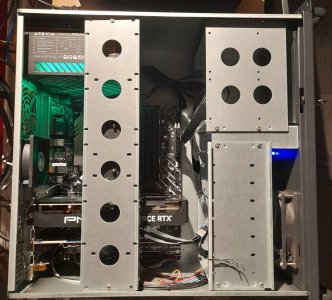
In my "case" I have a rack case... the CPU cooler seems a Thermalright 120 (air, single tower), plus there are two more fans (other than the one on the power supply and the ones on the video card).So it seems your machine is heavily throttling when pushing the CPU with a sustained workflow.
Unlike bursty workflows, audio is mostly sustained. Many plugins will keep consuming CPU even if you're not playing your project.
How's the cooling situation in this machine? What CPU cooler do you have? How many fans in the case?
I don't know if I can / should make a better cooling system. I must say that cores temperatures (measured with Core Temp) seem pretty normal to me, lower than 40C on idle and under 60C under load. Also I don't care about fan noise because my computer is in a separate (pretty fresh) room.
Attachments
StefanoM
Senior Sound Designer & Composer
Yeah,In my "case" I have a rack case... the CPU cooler seems a Thermalright 120 (air, single tower), plus there are two more fans (other than the one on the power supply and the ones on the video card).
I don't know if I can / should make a better cooling system. I must say that cores temperatures (measured with Core Temp) seem pretty normal to me, lower than 40C on idle and under 60C under load. Also I don't care about fan noise because my computer is in a separate (pretty fresh) room.
My system's temperature during heavy audio load is around 60-70°C, and it drops to lower than 40°C when idle, so it seems pretty normal. It's only when I have a LOT of Acustica Audio plugins running in a large session for extended periods that the temperature reaches 80/85°C at certain points.
In general, the throttling with these CPUs starts at temperatures over 95°C.
Furthermore, the R23 benchmark is quite intensive; however, based on my experience, real-life scenarios in audio applications differ from the R23 benchmark.
In fact, during the R23 test, I also observed temperatures of 85-92°C."
Last edited:
That makes me happy ha haKeep in mind with a
Apple Mac Studio M2 Ultra 76-GPU (2023)
You get about 28.500 in multi core with R23
Pier
kiffaudio.com
60C under sustained full multicore load?I must say that cores temperatures (measured with Core Temp) seem pretty normal to me, lower than 40C on idle and under 60C under load.
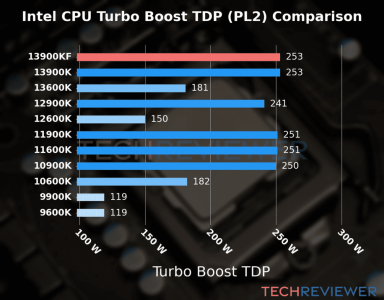
I'm surprised you would get those temps having a single air intake (I assume either the front or back fan on the case) and apparently a small CPU cooler. The 13900KF can reach up to 250W of TDP.
But then how do you explain the low Cinebench scores?
Also try pushing the CPU with Prime95 instead of Cinebench.
You could also try monitoring with this Intel utlity which will show you lots of data. If you see the clock speed rising and then going down there's throtlling.
StefanoM
Senior Sound Designer & Composer
35.000 points is not so bad for a 660 chipset60C under sustained full multicore load?
I'm surprised you would get those temps having a single air intake (I assume either the front or back fan on the case) and apparently a small CPU cooler. The 13900KF can reach up to 250W of TDP.
But then how do you explain the low Cinebench scores?
Also try pushing the CPU with Prime95 instead of Cinebench.
You could also try monitoring with this Intel utlity which will show you lots of data. If you see the clock speed rising and then going down there's throtlling.
29.000 after 10 minutes of R23 could be throttling but this test is a different condition then a typical daw senario, R23 loads all the cores at 100% for 10 minutes , it is not a real daw scenario.
Also on my system that is similar , on a real daw scenario I don’t have throttling in any situation, my max temp of all cores is 80/85c in the max full.
Pier
kiffaudio.com
But what's the point of having a very powerful CPU if you can't use it fully without throttling?35.000 points is not so bad for a 660 chipset
29.000 after 10 minutes of R23 could be throttling but this test is a different condition then a typical daw senario
StefanoM
Senior Sound Designer & Composer
The point is depend by your usage.But what's the point of having a very powerful CPU if you can't use it fully without throttling?
If you think to use all the cores at 100% for hours ( for example rendering ), ok maybe is better that you go with a 13900k + 690 /790 + liquid cooler, and maybe a very good air flow case ( more cost )
If you use a machine only like DAW, on my system : 13900k + 660 + A good Air cooler, just a bit of undervolt and I don’t have throttling in a real daw scenario ,I have all the power I need, and I have more power of a Mac Studio full optional ( considering only audio job ), and I spent 2900 euros and not 6000 euros
That is my point
Not all the scenario are the same !
Different usage different hardware combinations ( and you save money )
This is why I prefer Pc machines , more flexibility.
Of Course the Asus B660 is not the best MB for the 13900K
Last edited: