×
What's new

VSL Mystery release??? (UPDATE: Synchron Duality Strings)

I don't hear any difference in the two panning methods? Comparison below back to back (first is new style, then old style)

View attachment untitled.2023-10-08 22_19_34 SSP V1 Panning Comparison.mp3

So there must be more than just the panning settings - compressors etc have been mentioned?
The second one is the "new" one and you definitely hear that it's closer to the center. Synchron libraries don't have this wide outriggers, so they pan the LR extremely wide. It's subjective. I prefer the other sound, but it means you don't have this sense of wideness. Maybe you listening on speakers? On headphones it's night and day.

Yes, SDS and Smart Orchestra also uses compressors by default. But it doesn't change the mix.
 
Our chief recording engineer Bernd Mazagg sets up the mics for sampling and creates almost all mixer presets (with the exception of the Signature presets that are usually done by my colleague Johannes Kirsch and me).
Synchron Duality Strings mixer presets were created with the multi-stage concept in mind, which is the reason for more processed mixer presets, to fully utilize the unique features both stages add to the sound. There is absolutely nothing wrong with using a less processed mix with Duality Strings or a more processed mix with the other Synchron libraries - it's important that you like the sound and it sounds good to you.

If you like to have a more processed sound with the other Synchron libraries check out the additional mixer presets from Bernd allmost all our libraries also include, and of course the Signature presets where included. Of course you can always create your own mixes as well :)
 
Is there a simple way to keep the mic/mix leveling of a preset but turn off all effects (compression and reverb) without going into every mic?
 
Is there a simple way to keep the mic/mix leveling of a preset but turn off all effects (compression and reverb) without going into every mic?
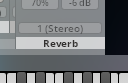
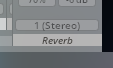
Reverb: If the reverb module on the right side is used disable it with a click on "Reverb"

VSL Mystery release??? (UPDATE: Synchron Duality Strings) -> VSL Mystery release??? (UPDATE: Synchron Duality Strings)

If it's not used in most cases there will be an additional AUX channel instead. Simply disable it with click on the channel name.

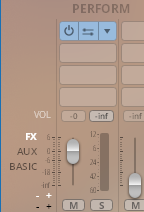
To disable all insert-plugins click on FX on the left side of the mixer and click on the on/off switch of each plugin (will appear on mouse over):

VSL Mystery release??? (UPDATE: Synchron Duality Strings)
 
Yep yep, that's what I've been doing. Clicking the little "off" thingy for each. Was mostly wondering if there's a "no, thank you" option for all such inserts across the board while keeping the mic balance. Seems like clicking each then saving my own to not have to do it again is the way to go.
 
Have a look at the attached screenshots.
... just keep in mind that Balancing and Panning aren't the same.

Using the Balancer means that you will simply lower the volume of either the left or the right channel, consequently you will lose some information that might only be present in that channel. Typically, the signal will also appear to be quieter, overall.

Panning, OTOH, will keep this information alive and just change the relative position of the panned channel in the stereo panorama. Depending on the chosen pan law and the audio content your signal could get considerably louder like that.
 
If you like to have a more processed sound with the other Synchron libraries check out the additional mixer presets
Feature request (if it isn't yet there, and I just didn't discover it): copy and paste of mixer presets between instrument presets! It would make extending the mix work done in a library to a different one incredibly fast!

Paolo
 
Feature request (if it isn't yet there, and I just didn't discover it): copy and paste of mixer presets between instrument presets! It would make extending the mix work done in a library to a different one incredibly fast!

Paolo
You can right click the mixer and copy all settings and insert it in another instrument - do not forget to save it :)
 
... just keep in mind that Balancing and Panning aren't the same.

Using the Balancer means that you will simply lower the volume of either the left or the right channel, consequently you will lose some information that might only be present in that channel. Typically, the signal will also appear to be quieter, overall.

Panning, OTOH, will keep this information alive and just change the relative position of the panned channel in the stereo panorama. Depending on the chosen pan law and the audio content your signal could get considerably louder like that.
Thanks, Dietz. I know that. I only wanted to understand why the "new" mixes (Duality, Smart Orchestra) are different to the previous ones. I never liked them and prefer this new approach, if it's a new approach at all, or, let's say, mixing decision.
 
Another articulation that I miss from SSP is the pianissimo. SDS can't do it, as far as I can see. It is something between pp and flautando, and there is nothing that can replace it. I hope it is included in the sul tasto expansion.

Paolo
 
Last edited:
Another articulation that I miss from SSP is the pianissimo. SDS can't do it, as far as I can see. It is something between pp and flautando, and there is nothing that can replace it. I hope it included in the sul tasto expansion.

Paolo
In the meantime you can experiment with using timbre adjust to further soften the sound.
 
Well, I can’t imagine they’ll be focusing on the F and FF layers in the sul tasto expansion so getting a pianissimo layer in there sounds like a reasonable assumption.
Hopefully we’ll also get the senza vibrato option there as well since it was included in SSP but missing in SDS. I guess it would make sense to include that in an extension library focussing on the softest side of the string sound.
 
Question for you wonderful people: are you using the VelXF version at all - e.g. all the time, just sometimes?

I am curious because I struggle balancing volume between velocity, master volume, expression & velXF fader values.
 
Question for you wonderful people: are you using the VelXF version at all - e.g. all the time, just sometimes?

I am curious because I struggle balancing volume between velocity, master volume, expression & velXF fader values.
I always use VelXF presets, but I don't automate Master Volume and use Expression instead if necassary.
 
Question for you wonderful people: are you using the VelXF version at all - e.g. all the time, just sometimes?

I am curious because I struggle balancing volume between velocity, master volume, expression & velXF fader values.
Don't forget the Timbre Adjust, it will give you more color.

Vel.XF - Timbre Adjust - Expression
 
I appreciate the replies. I shouldn't have implied that I automate master volume (or even mentioned it) as I don't.

But if you're switching between longs and shorts often, it just seems unwieldy for me to try and match (velocity & expression) on the shorts and (expression and velXF) on the longs.

Can one automate the toggling on/off of velXF?
 
Back
Top Bottom